We've all been there. It's Friday afternoon, you've got a yellow pad full of scribbled notes from the week, and 30+ time entries to create before you can go home. With traditional billing software, that's 30 minutes of clicking, tabbing, and typing. With TimeNet Law 6's Bulk Import, it's 10 seconds.
Paste your notes, let the natural language engine parse them, review, and you're done.
Three Ways In
Import Entries opens from the File menu, and where you open it from decides what it does.
- From anywhere. Choose File → Import Entries with no matter open. Nothing is pinned, so every row has to say who it belongs to, and the parser resolves those client and matter names for you.
- From inside a matter. The same menu item, opened from a matter window, pins that matter to the import. Rows no longer have to name a matter, because you already told it which one.
- By dropping a file on a matter. Drag a CSV, TSV, or text file onto an open matter window and you land in the same place as the scoped menu item, one step sooner.
What pinning actually saves you is the Matter column. A scoped import never asks you to map one, and never asks you to confirm a matter you are already looking at. If you are importing one matter's worth of time, start from that matter and skip the step.
The file type decides the rest. Spreadsheets and CSVs go straight to column mapping. Plain text and RTF are read as natural language, one entry per line. Photographs and PDFs of handwritten timesheets take a different road: see Time Drop, where Oasis reads the handwriting on your Mac before the entries ever reach this window.
How It Works
Five steps. The whole thing takes longer to explain than to do.
Open Bulk Import
From the menu: File → Bulk Import, or hit ⌘ + Shift + I. The import window opens with a blank text area waiting for your notes.
Paste Your Entries
Type or paste your time entries, one per line. Include a duration, a description of what you did, and the word "for" before the matter name. That's the pattern the parser needs.
AI Parses
TimeNet's natural language engine identifies individual entries, extracts durations, matches clients and matters, and pulls out descriptions. It happens in under a second.
Review
See all parsed entries in a clean table. Color-coded by confidence. Edit any that need tweaks - click any cell to fix it inline.
Import
Hit Import All and every entry is created instantly. They show up in your Launchpad, timesheets, and reports immediately.
The Syntax
One line per entry. The golden rule: use the word "for" or "to" before your matter name. That's how the parser knows where your task description ends and the matter begins.
The Pattern
All of these work:
What the Parser Handles
- Duration formats — "1.5 hours", "45 min", "3h", "2:30", "0.5 hours", "20 min", "1 hour", ".25h" — just about any format you'd naturally write
- Timekeeper names — Full names matched against your firm's timekeeper list, placed anywhere in the line
- Fuzzy matter matching — Partial names work. "Cascade IPA" matches "Trademark Registration – Cascade IPA"
- Billing rates — Auto-loaded from your matter settings, per timekeeper
- Command prefixes — "log", "add", "record", "enter" all work (and are all optional)
When You Have a Timekeeper Selected
If you've selected a specific timekeeper in the Import window (not "All Timekeepers"), you can skip the name — it's assigned automatically:
The word "for" (or "to") is the magic keyword. Everything before it becomes the task description. Everything after it is matched against your matters. No keyword, no match — so always include it.
The Review Table
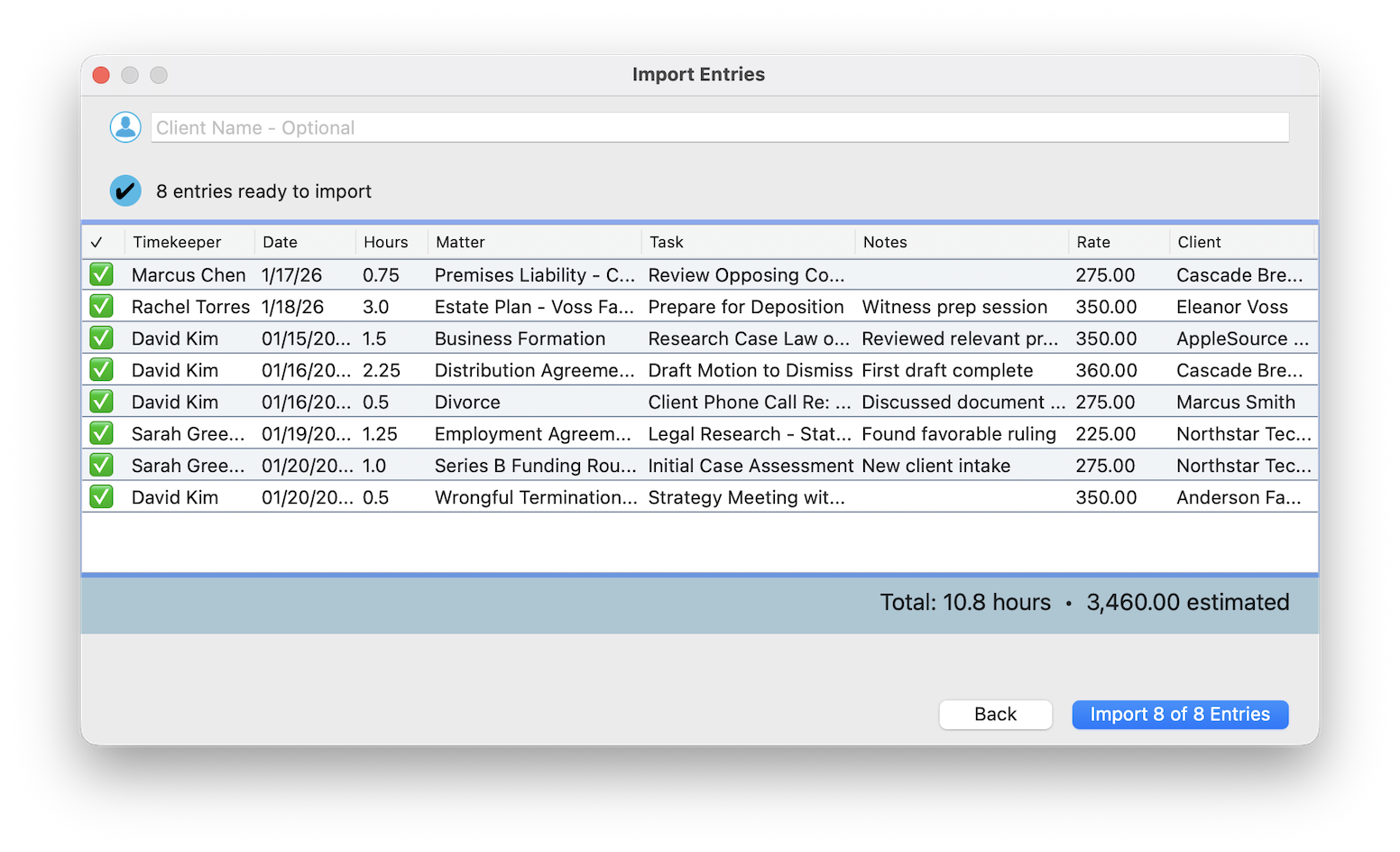
After parsing, you see a preview table with every entry the engine found. Each row shows:
- ✅ Checkbox — select or deselect for import
- Timekeeper — extracted from the line or defaulted to your selection
- Date — parsed from your notes or defaults to today
- Hours — duration extracted and normalized
- Matter — fuzzy matched against your matter list
- Task — the description extracted from your text
- Notes — additional notes if present
- Rate — auto-loaded from matter settings for the timekeeper
- Client — resolved from the matched matter
Valid vs. Invalid
Entries are split into two groups:
- Valid entries — Timekeeper, matter, and duration all resolved. Ready to import.
- Invalid entries — Something couldn't be resolved. Click "View Errors" to see what's missing (usually a matter name the parser couldn't match).
Click any cell to edit inline. Fix a matter match, adjust a duration, edit a description — all right in the table.
If an entry shows as invalid, it's almost always because the matter name didn't match. Make sure you're using a recognizable part of the matter name (not just the client name) after "for" or "to".
Fuzzy Matching in Bulk
Same fuzzy matching engine as Quick Capture, but working at scale:
- Each line is independently parsed and matched
- Partial client names, nicknames, and matter numbers all work
- If the same client appears multiple times, it matches them all consistently
- Disambiguation popup only appears when truly ambiguous - rare in bulk mode because context from surrounding entries helps resolve matches
Import Sources
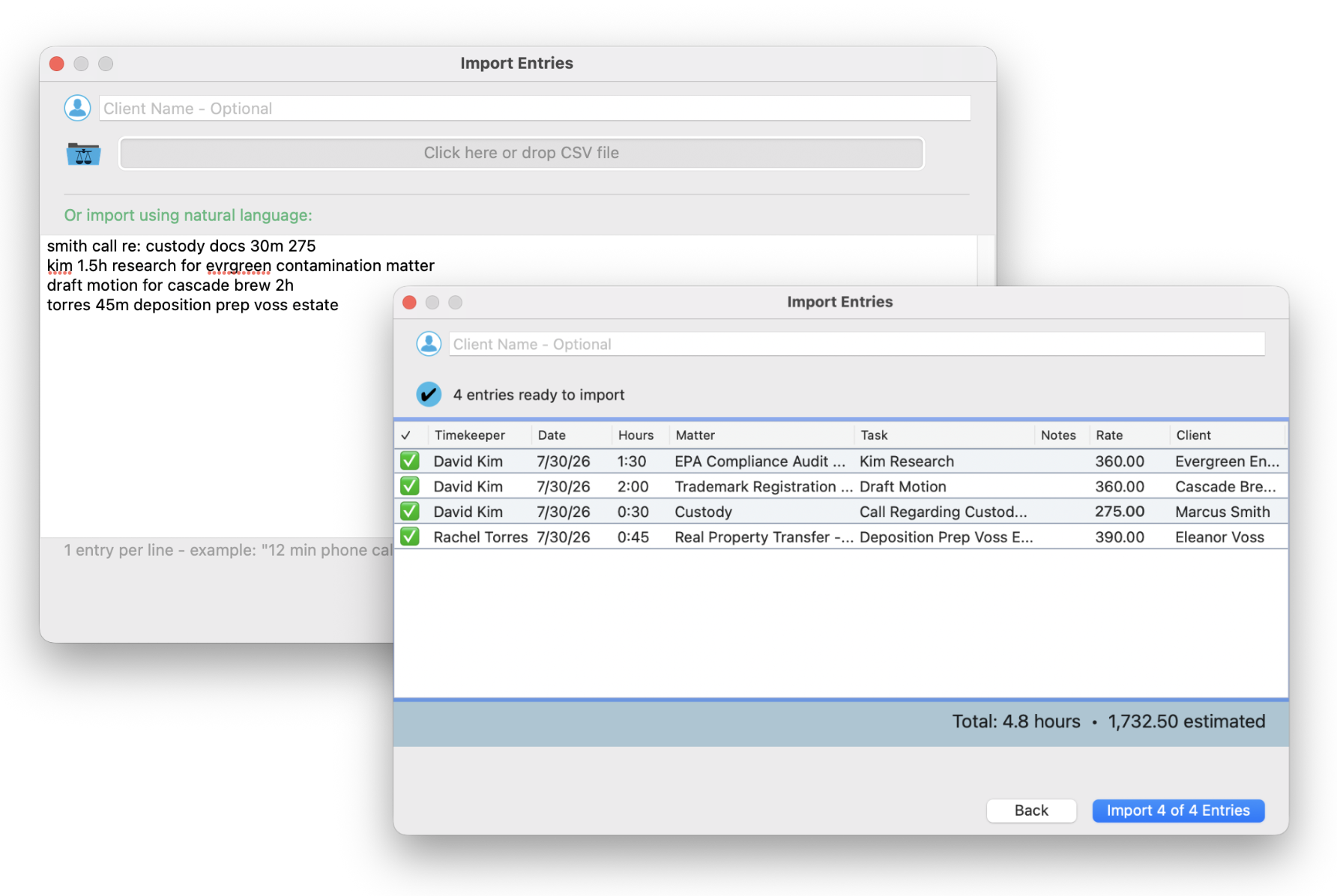
Paste from anywhere. If there's a duration and a client name in there, TimeNet will find it.
You can even select text from a document and paste it directly. The parser doesn't care where it came from - just that there's something to work with.
Two Ways to Import
The Import Entries window gives you two modes depending on what you're working with:
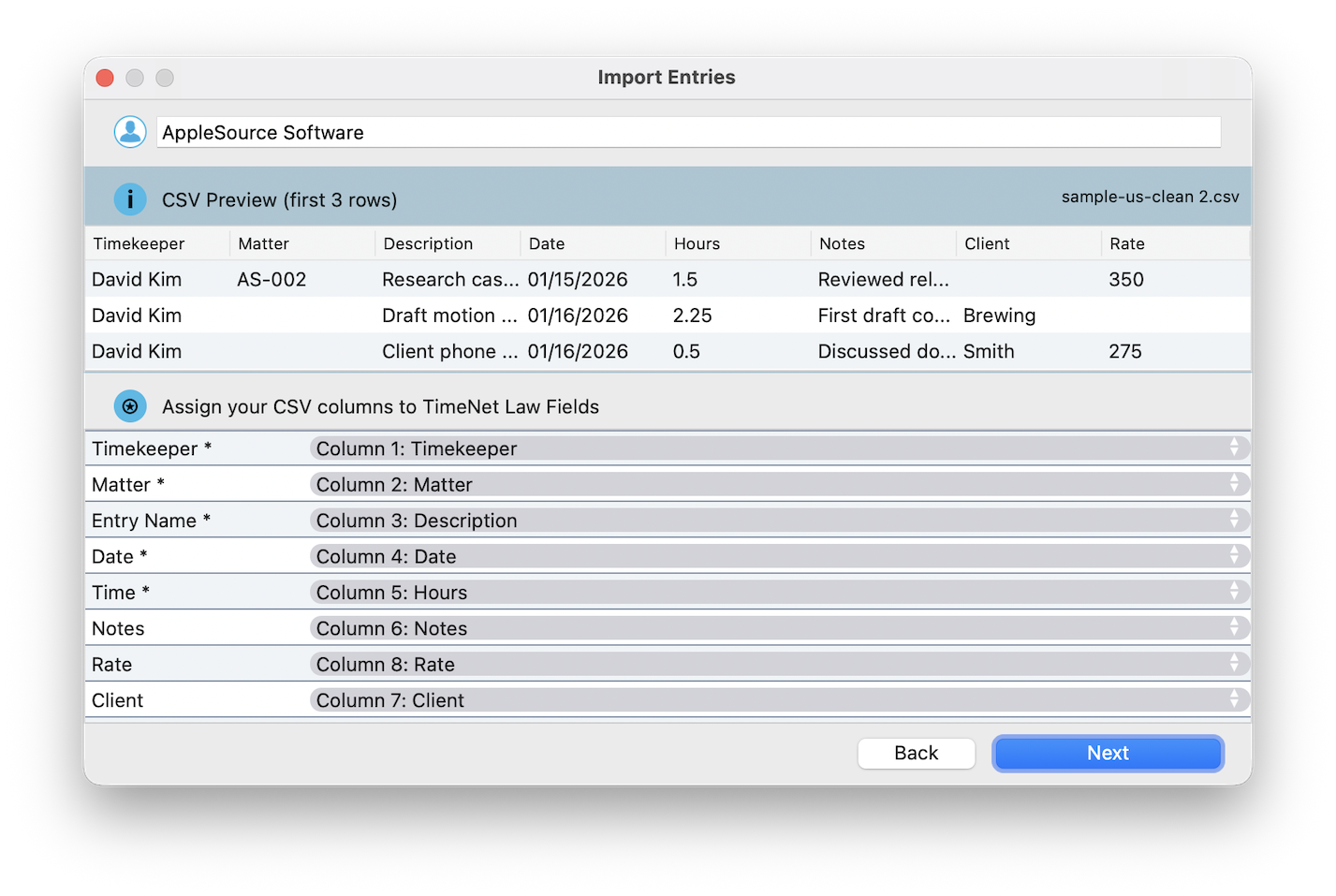
- Spreadsheet / CSV — Paste structured data with columns (timekeeper, date, hours, matter, task, rate). Great for data exports from other billing systems or organized spreadsheets. Tab-separated and comma-separated both work.
- Natural Language — Type or paste plain-English entries, one per line. Great for quick dictation-style entry using the "for/to" pattern described above.
Both modes parse instantly, show you the same preview table, and let you edit inline before importing.
If you have structured data, use CSV mode — it's more predictable. Natural language mode shines when you're dictating entries or typing them from memory, where the "for [matter]" pattern feels natural.
After Import
Once imported, entries behave exactly like any other time entry in the system:
- Appear in Launchpad, your timesheets, and all reports
- Fully editable - change anything after import
- Ready for invoicing immediately
- Audit trail shows they were created via Bulk Import (with timestamp)
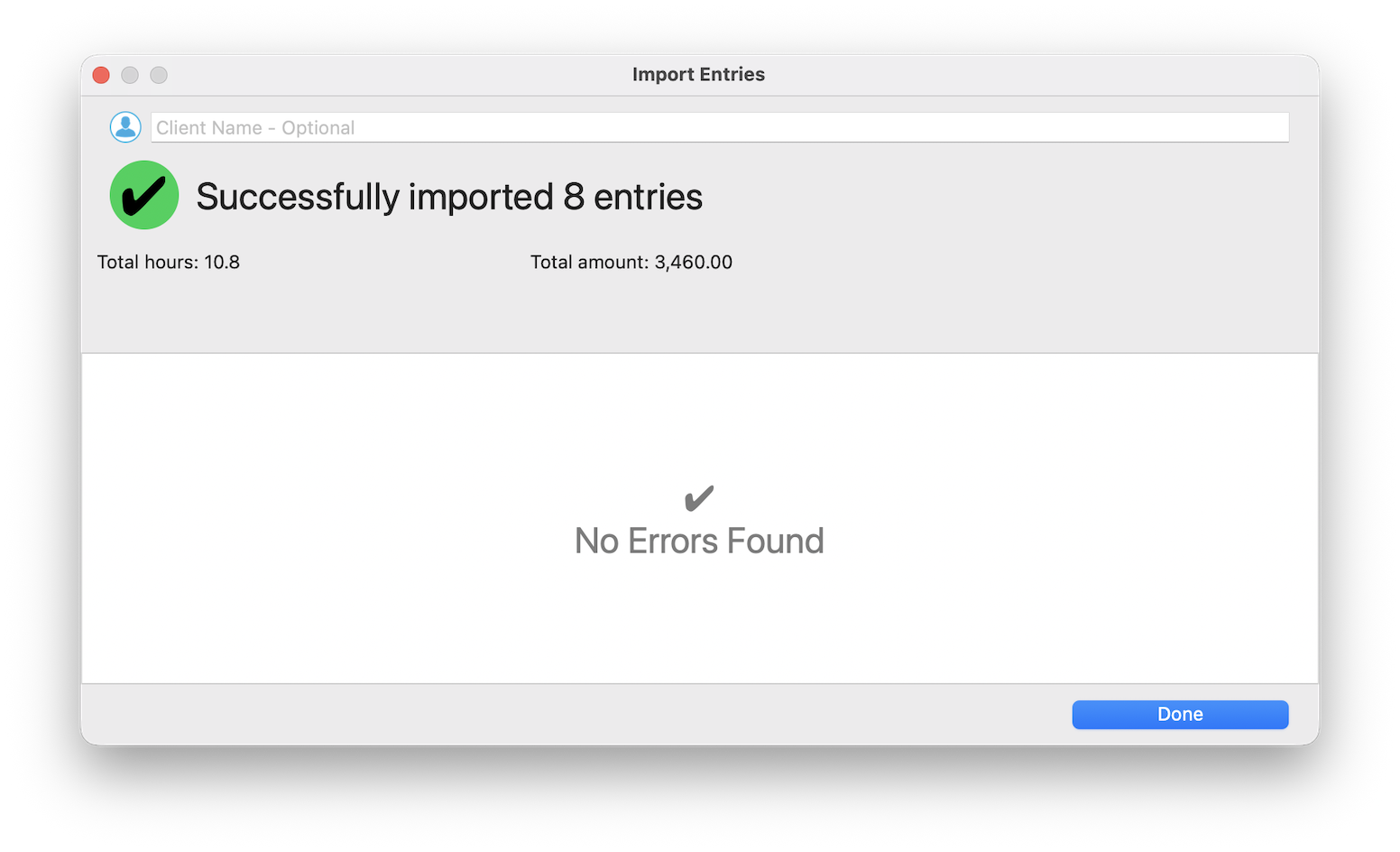
Stop dreading Friday afternoon data entry. Scribble notes all week however you want, paste them in on Friday, review the parsed results, hit Import, and go home. Napkin to invoice in 10 seconds. That's the TimeNet Law 6 difference.
Related Tutorials
Bulk Import is just one way TimeNet Law makes time entry dangerously fast. Check out these related features:
- Time Drop - drop a photo of a handwritten timesheet on a matter and let Oasis read it
- Oasis - the private, on-device AI doing the parsing behind all of this
- Quick Capture - for one-at-a-time fast entry throughout the day
- Voice Commands - for hands-free entry when you're on the move
- Receipt Drop - for turning expense receipts into entries automatically
Parser Not Picking Something Up? Perry Can Help.
If you've got a note format the parser struggles with, send it over. Perry will either show you a trick or improve the engine.