Every reimbursable expense starts as a scrap of paper and ends, too often, as money you never billed. The filing fee receipt in your jacket pocket. The client lunch you meant to log. The expert's invoice buried in your inbox. Each one is real money, and each one leaks the moment you set it down.
Receipt Drop closes the leak. Drop a receipt onto the matter it belongs to, and Oasis reads it on the spot, fills out the expense, and files the receipt with the matter. What used to be a form is now a single drag.
Getting Started
Open the matter the expense belongs to and drag a receipt onto the window. An image or a PDF, a phone photo or a scan. That is the whole setup.
HERO VIDEO COMING SOON
Drag a receipt onto a matter → drop on the expense target → Oasis fills the form → saved and filed. A fifteen-second loop.
Why Receipts Leak Money
Reimbursable costs are some of the easiest revenue a firm has, and some of the easiest to lose. The work is already done. The money was already spent on the client's behalf. All that stands between you and recovering it is the chore of typing a vendor, an amount, and a date into a form, and remembering to keep the paper in case anyone ever asks.
So the receipts pile up in a drawer, the small ones get written off out of sheer friction, and at year end nobody can find the proof for the ones that did get billed. Receipt Drop removes the friction entirely, which is the only thing that ever actually fixes this.
Drop It on the Matter
Open the matter and drag your receipt onto the window. TimeNet Law shows you two drop targets: time entries on the left, expenses on the right. Drop your receipt on the expense side.
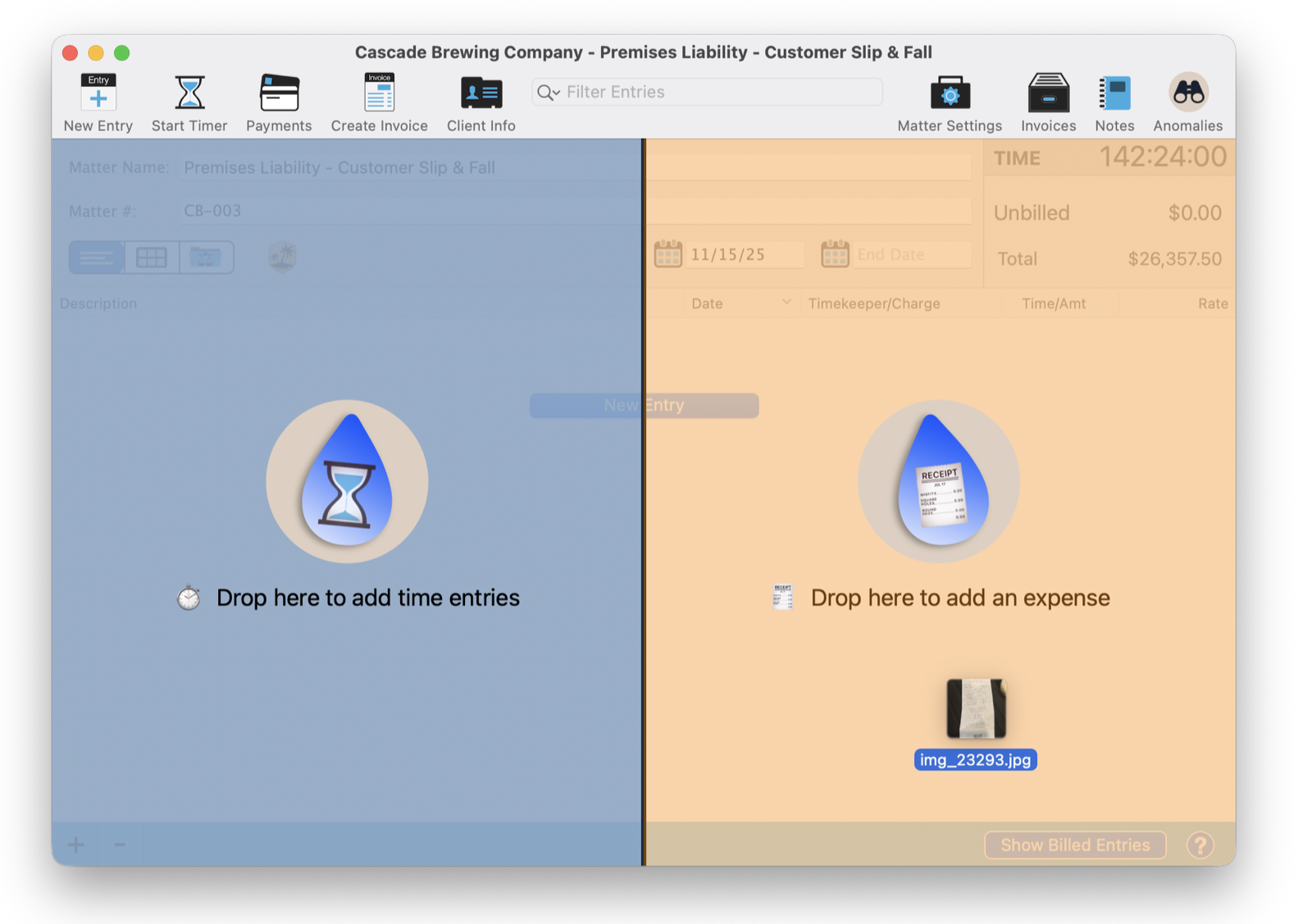
That split is deliberate. The same drag-and-drop that captures an expense from a receipt can capture billable time from a document on the left, a feature called Time Drop. Right now, you are dropping a receipt, so aim for the expense target on the right.
Oasis Reads It
By the time the New Expense window opens, the work is already done. Oasis has read the receipt and filled in the form.
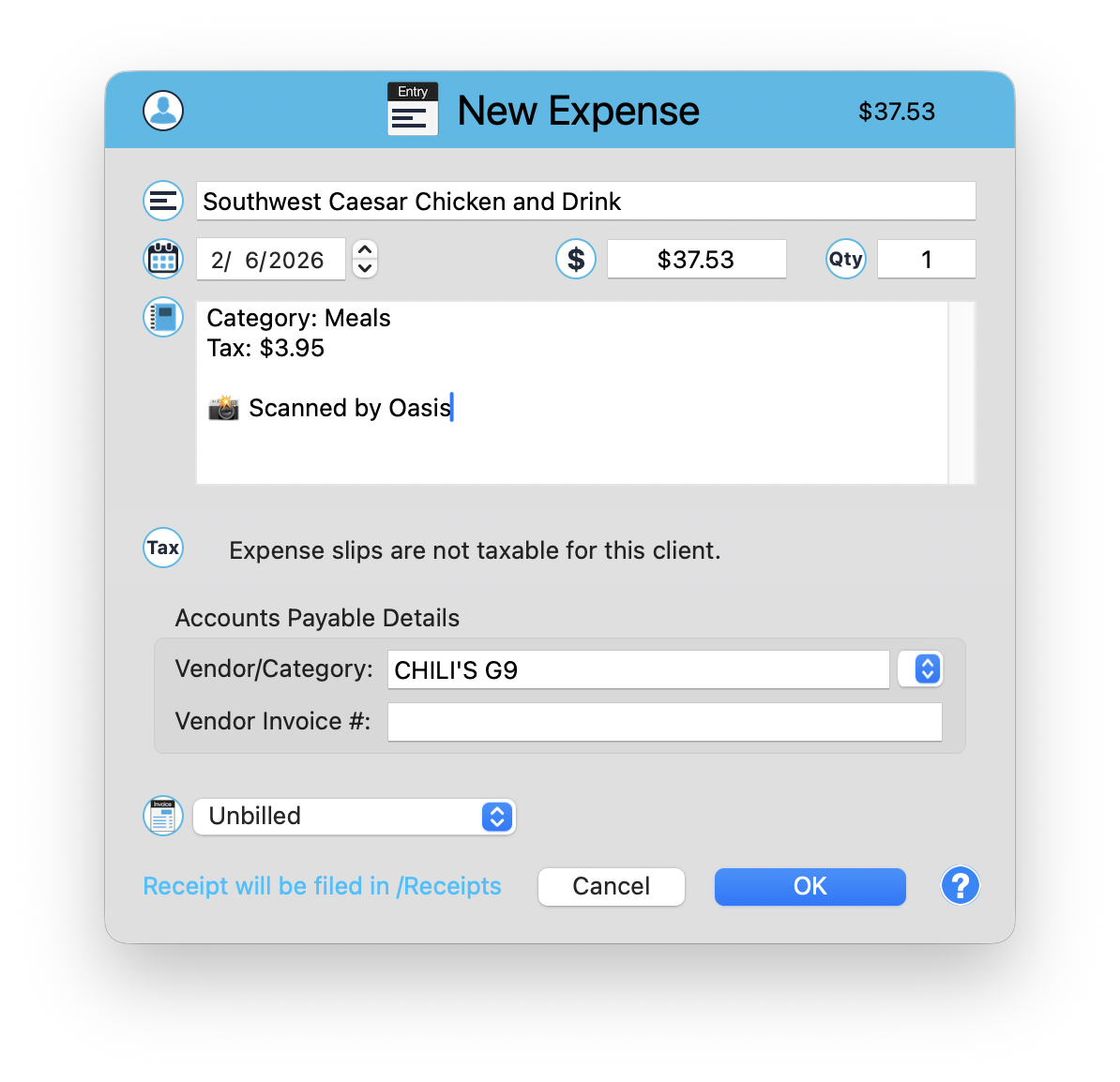
From a photo of a lunch receipt, Oasis pulled the vendor (CHILI'S G9), the amount ($37.53), the date, a clean description (Southwest Caesar Chicken and Drink), the category (Meals), and even the tax ($3.95). The Scanned by Oasis note tells you exactly where the numbers came from. You did not type a single character.
Review and Save
What Oasis fills in is a draft, not a done deal. Read it over, fix anything that needs fixing, decide whether it is billable or absorbed, and click OK. TimeNet Law even knows your client's tax rules, so when a client's expenses are not taxable, it says so right on the form instead of letting a stray tax line slip through.
A phone photo works as well as a scanner. Snap the receipt while you are still at the table, move the picture to your Mac, and drop it on the matter when you are back at your desk. The paper has done its job and can go in the bin, because the image is now filed with the matter.
Filed Automatically
Capturing the number is only half the job. The other half is keeping the proof. When you save the expense, the receipt image is filed in the matter's /Receipts folder automatically. You do not name it, move it, or think about it.
So when a client questions a cost three years from now, or an auditor wants to see backup for a disbursement, the original is one click away, sitting exactly where it belongs, with the matter it was spent on.
Local and Private
The scanning happens on your Mac. Oasis reads the receipt with local AI, so the image is never uploaded to a receipt-scanning service, never sent to a third party, never anywhere but your own machine. Your clients' spending stays as private as everything else in TimeNet Law.
Snap It and Move On
The best expense system is the one you actually use, and you will only use the one that takes no effort. Receipt Drop is that system. Snap it, drop it, done. The cost is captured, the math is right, the receipt is filed, and you are back to practicing law.
Do it every time, for every receipt, and the small costs stop leaking. Over a year, that is real money you were quietly leaving on the table.
Related Tutorials
Want a Hand Setting Up Expenses? Just Ask Perry.
Receipt Drop is built to be obvious, but if you want a walkthrough on your own matters, call, email, or screen share. The person who built this will show you around personally.