Unrecorded time is unbilled time, and lawyers lose it constantly. The two hours you spent on a call get jotted on a legal pad and never make it into the system. The quick task between meetings is gone by lunch. Time tracking fails not because lawyers are careless, but because stopping to type a formal entry in the middle of real work is friction, and friction always loses.
Time Drop removes the friction. Capture your time the way you already do, in your own shorthand, and let Oasis do the transcribing. Scribble it on a napkin, photograph it, drop it on the matter. Ten seconds later it is a clean set of billable entries.
HERO VIDEO COMING SOON
Photograph a handwritten napkin → drop it on the matter → Oasis reads it → review → import. A twenty-second loop.
The Time-Capture Problem
Every firm loses real money to time that was worked but never written down. It is the single biggest leak in legal billing, and it happens for one reason: capturing time the formal way, opening the app, picking the matter, typing the description, takes more effort in the moment than the lawyer has to spare. So they scribble it down to enter "later," and later never comes.
The fix is not more discipline. It is less friction. Let people capture time the way that is natural, and handle the formal part for them.
Drop Your Timesheet
Write your time however you think. A list of names and hours, a day-by-day rundown, full sentences or two-word shorthand. Snap a photo of it, and drop the image onto the matter.
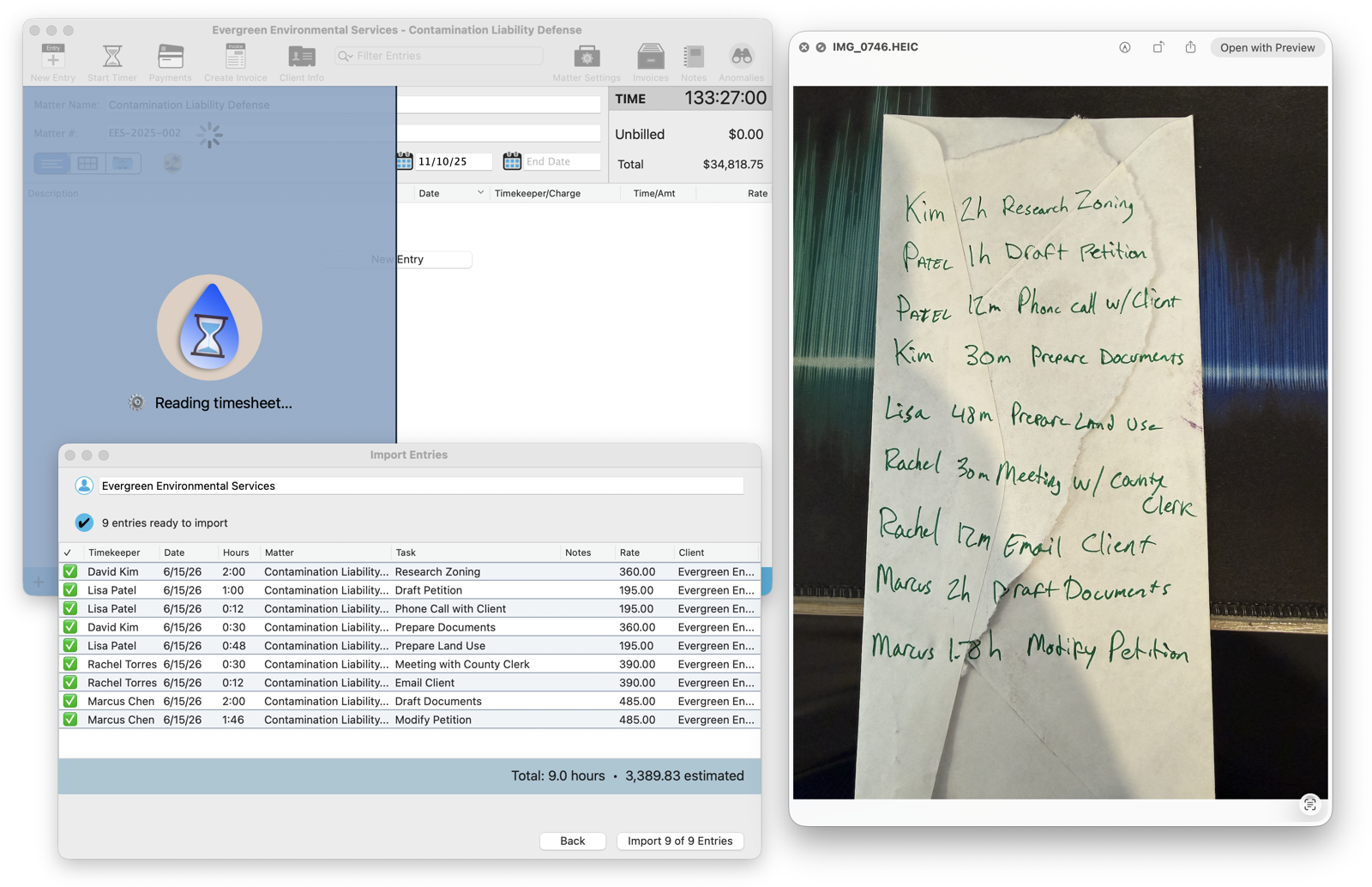
That is a real handwritten napkin on the right, the kind that usually dies in a jacket pocket. Drop it on the matter and TimeNet Law shows you the droplet and Reading timesheet, and Oasis gets to work.
Oasis Reads Your Handwriting
This is genuine handwriting recognition, running locally. Oasis reads each scrawled line, "Kim 2h Research Zoning," "Patel 12m Phone call w/ Client," and turns it into a structured entry: a timekeeper, a duration, a task. It even priced them, because it knows each timekeeper's rate. Nine messy lines on a napkin became nine clean entries totaling 9.0 hours and over $3,300, and you have not touched the keyboard.
It Knows Names and Days
The reading is the easy part. The intelligence is in what Oasis does with it. "Kim" becomes David Kim and "Patel" becomes Lisa Patel, matched to your actual timekeepers. And when you write by day of the week, it does something even more useful.
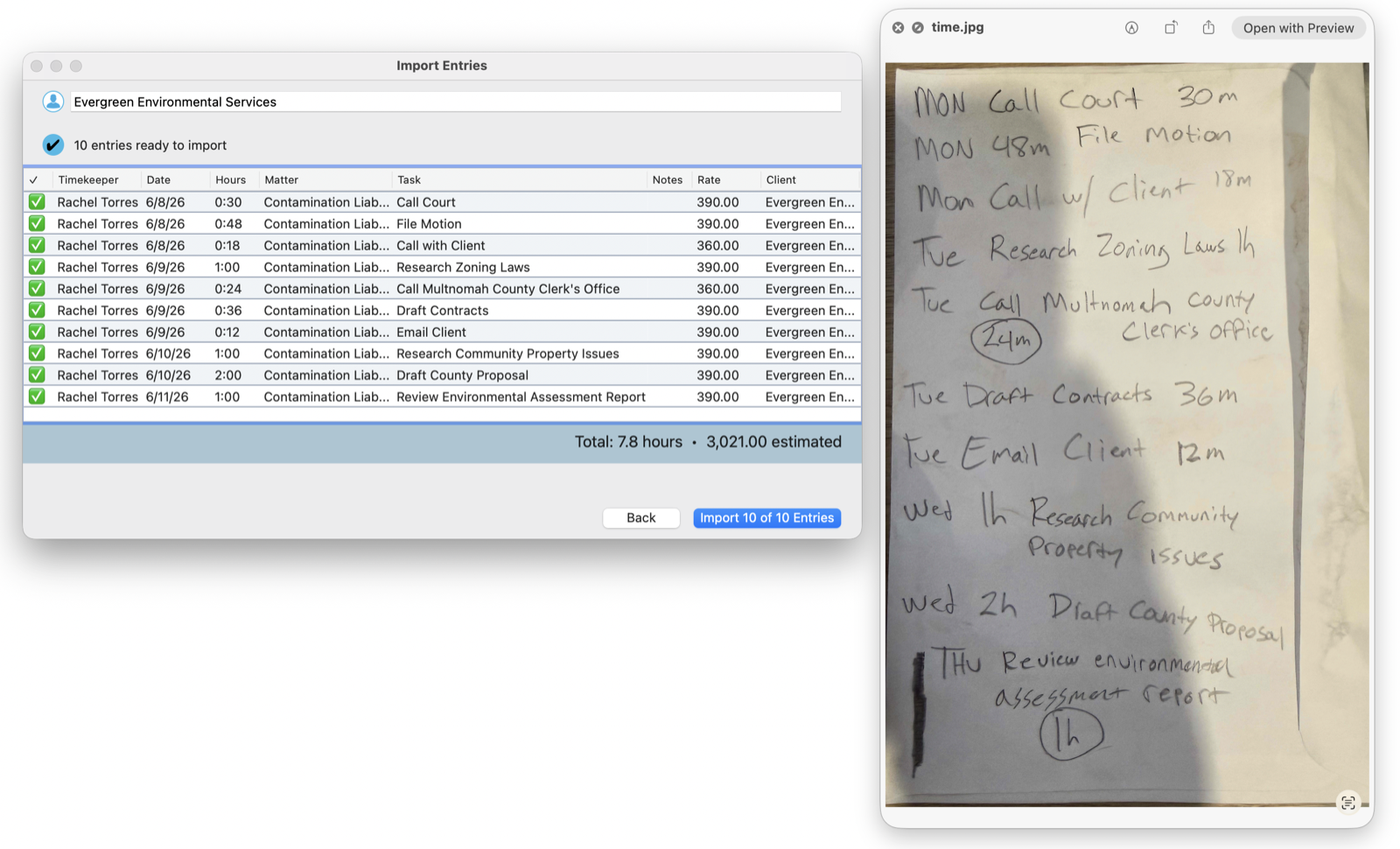
Here the note is organized as MON, TUE, WED, THU. Oasis maps each day to the correct calendar date, so "MON Call Court 30m" lands on the right Monday, not today. You write the way you think about your week, and Time Drop translates it into dated, billable entries.
Review and Import
Nothing is committed until you say so. Oasis hands you an Import Entries preview: every parsed entry with its timekeeper, date, hours, task, and rate, plus the running totals at the bottom, hours and estimated dollars. Read it the way you would read an associate's draft. Uncheck anything you do not want, then click Import.
You stay in control of every line. Oasis does the tedious transcription; you do the one thing that actually requires a lawyer, the final say.
Imported and Billable
Click import and the entries drop straight into the matter as real, billable time, priced and ready to invoice.
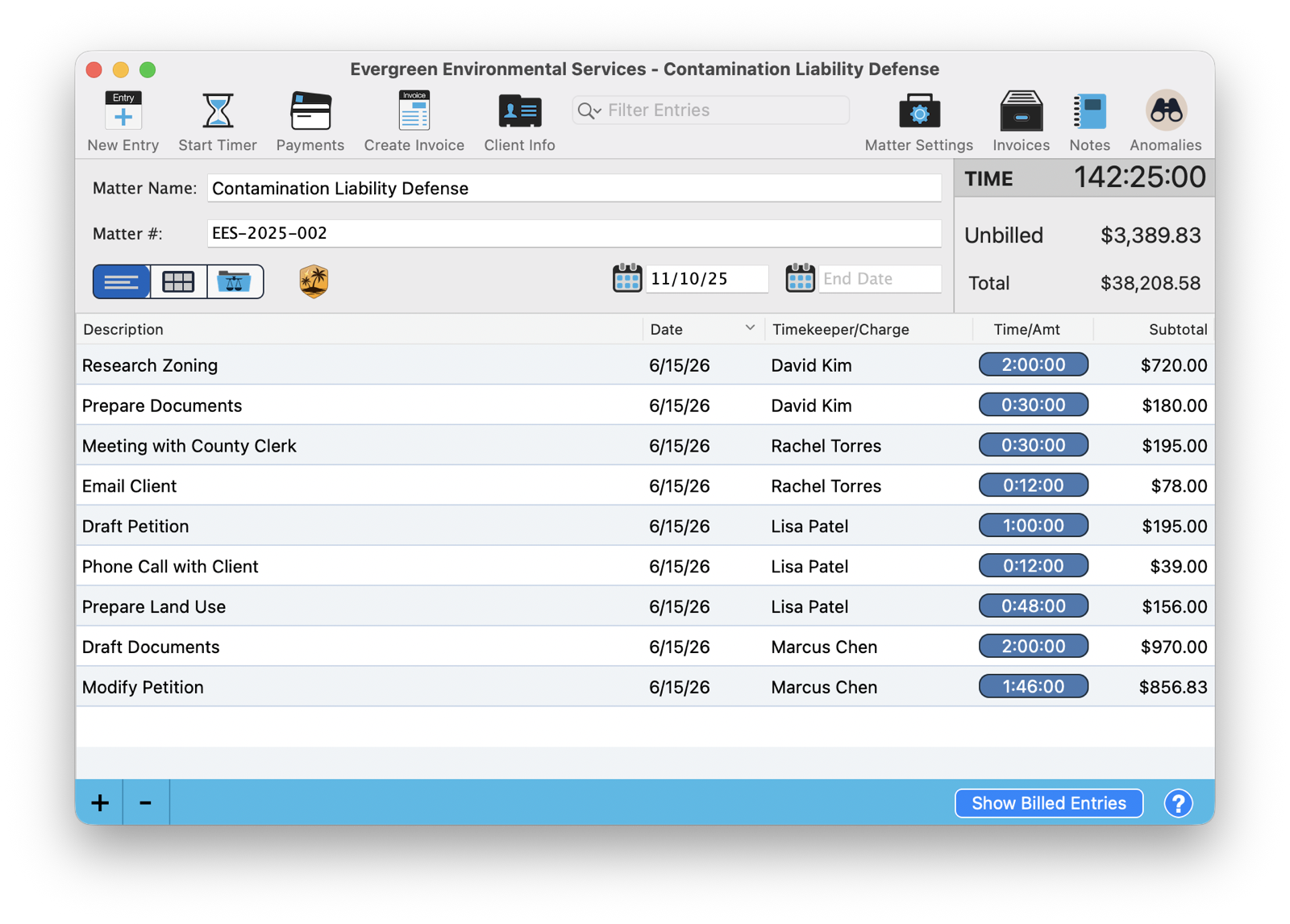
What was an unreadable napkin a moment ago is now line items on the matter, each with its hours and its dollar value, contributing to the unbilled total. TimeNet Law confirms the import with a plain Successfully imported, No Errors Found, and the work you almost forgot to bill is now money you will actually collect.
Local and Private
The handwriting recognition runs on your Mac through Oasis. Your timesheet photo, with its client names and case details, is never uploaded to a transcription service or sent anywhere. The whole napkin-to-billable trip happens on your own machine, the same as everything else in TimeNet Law.
Capture Time the Way You Work
The best time-tracking habit is the one that fits how you already work, not the one that fights it. Keep a running list on a legal pad through the day, the way good lawyers always have. Then, instead of retyping it, photograph it and drop it. Ten seconds, and a day of scribbled work is captured, priced, and billable.
That is the difference between time tracking you mean to do and time tracking you actually do. And the gap between those two is the difference in your year.
Related Tutorials
Curious Whether It Can Read Your Handwriting? Just Ask Perry.
Send a photo of how you actually jot your time and I will show you what Time Drop makes of it. Call, email, or screen share, and the person who built this will run it with you.