Reconciliation is the chore every lawyer dreads and the bar requires. Match your bank statement to your ledger, line by line, and account for every penny of difference. Get it wrong on a trust account and you are not just out of balance, you are out of compliance.
Smart Reconcile turns an afternoon into a few seconds. Drop your bank statement and the engine cross-checks every transaction against your ledger, then hands you only the genuine discrepancies, each one explained. No staring at two columns of numbers. No hunting for the nine-cent transposition that throws off the whole month. No other legal billing software does this.
Getting to Smart Reconcile
Open Accounting from the sidebar, select the specific account you want to reconcile, and click Smart Reconcile in the toolbar. Smart Reconcile works one account at a time, so pick Trust, Operating, or whichever account matches the statement in front of you, not All Accounts.
HERO VIDEO COMING SOON
Drop → enter bank balance → Analyze → review the discrepancy → fix it live → reconciled. A twenty-second loop.
Why Reconciliation Matters
For an operating account, reconciliation keeps your books honest. For a trust account, it keeps your license safe. Every state bar requires lawyers to reconcile IOLTA and trust accounts on a schedule, and a discrepancy you miss this month is a question you answer for later. The math is not hard. It is just tedious, repetitive, and unforgiving, which is exactly the kind of work that gets postponed until it becomes a problem.
Smart Reconcile exists to make that duty fast enough that you actually do it, every time. It does not replace your judgment. It removes the hours of line-by-line comparison that stand between you and the answer.
Opening Smart Reconcile
Smart Reconcile lives in the Accounting window, one click from your ledger. Select an account in the sidebar, and the toolbar button is right there at the top left, next to Categories, Export, and Reconciliation.
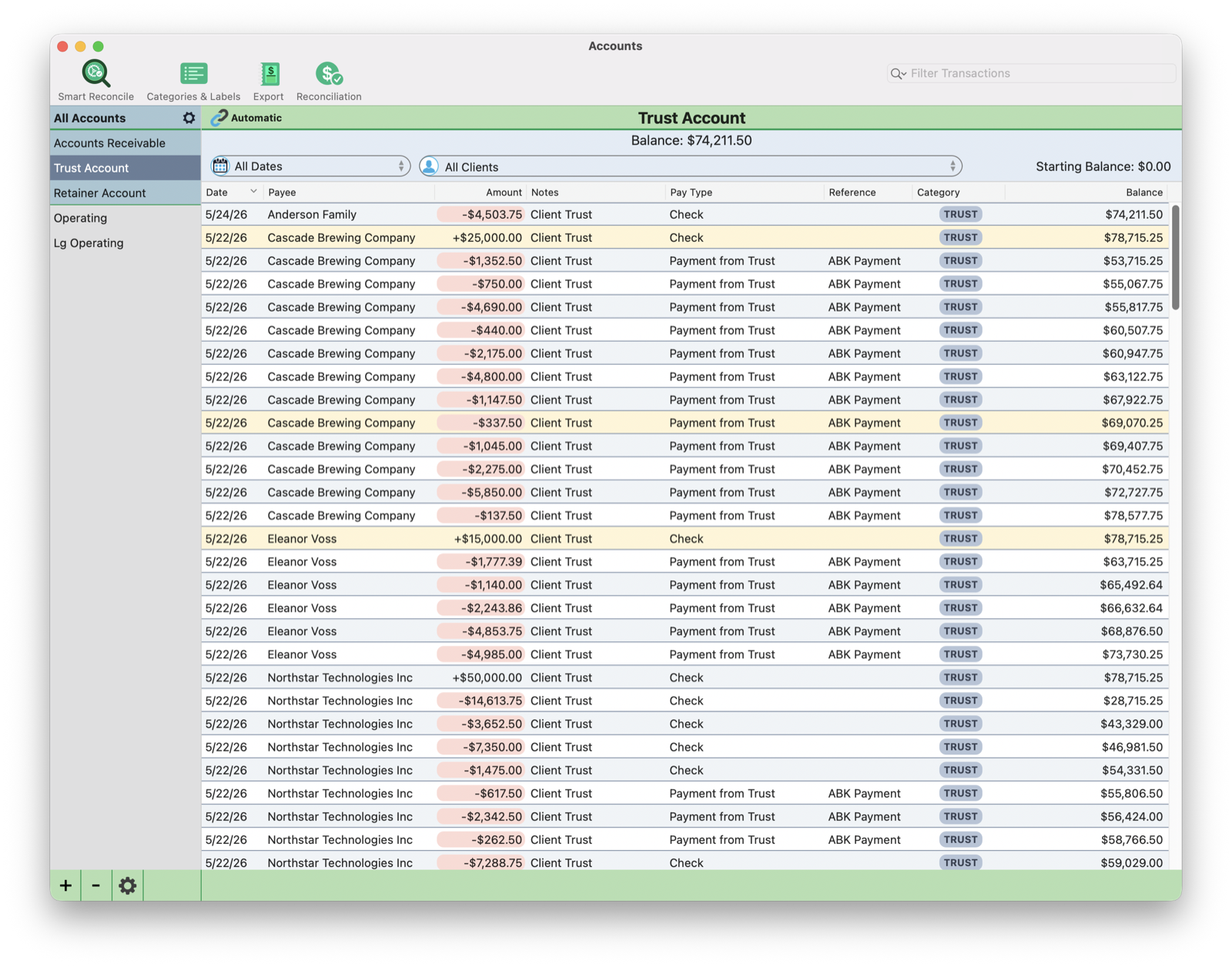
Your ledger already does some of the watching for you. The running balance column tracks the account after every transaction, and TimeNet Law flags unusual entries in amber right in the ledger, so outliers catch your eye before you even start. Smart Reconcile is the next step: the formal, line-by-line proof that your books and your bank agree.
Enter Your Bank Balance
Start with the number on your statement. Type your bank's ending balance into Smart Reconcile and the Off by indicator goes to work immediately, showing the exact gap between what your bank says and what your ledger says.
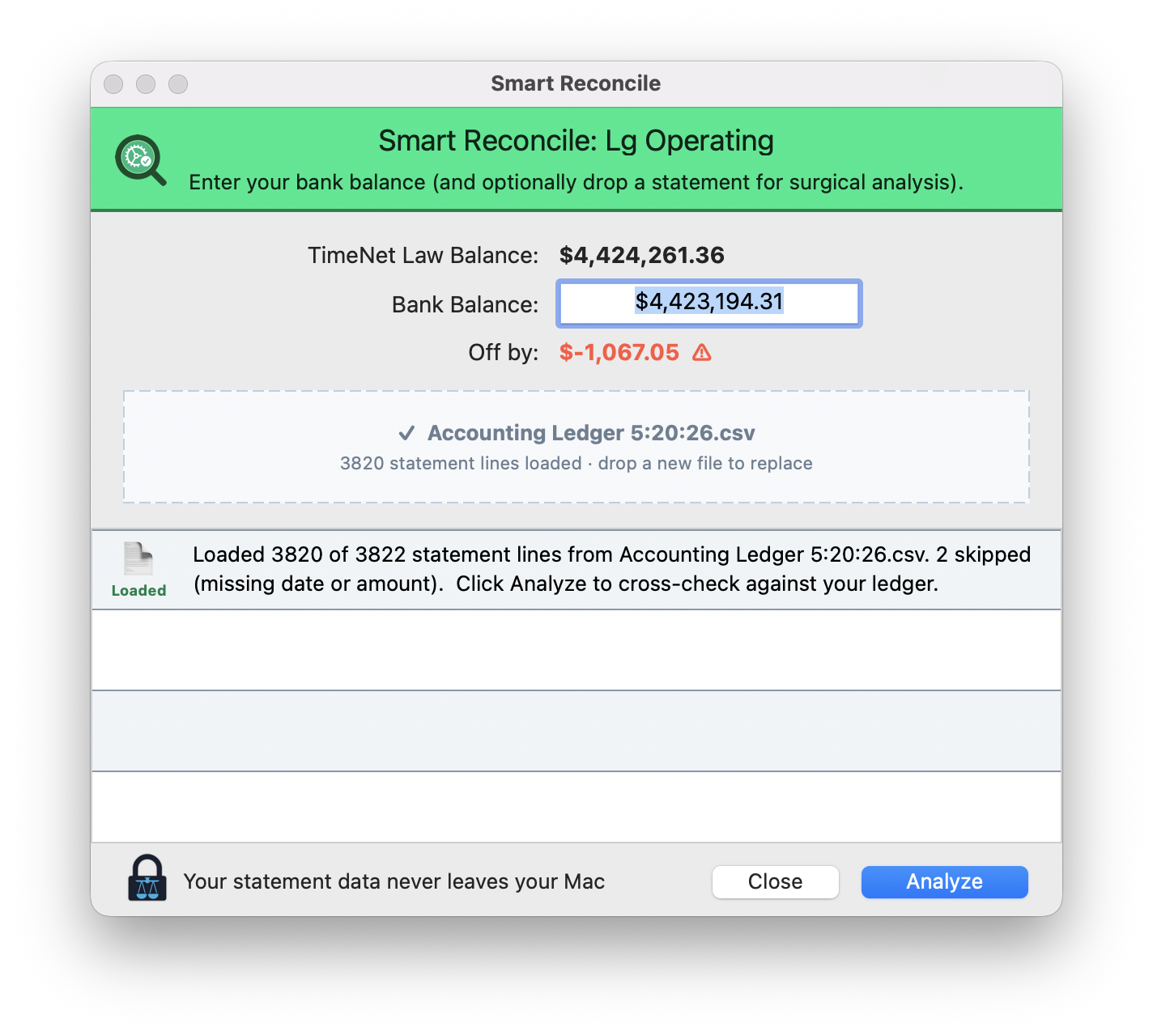
Here the ledger reads $4,424,261.36, the bank reads $4,423,194.31, and Smart Reconcile shows you are Off by -$1,067.05 in red. That number is your target. The moment your two balances agree, the indicator turns and you are reconciled. Until then, it is a live readout you can chase down to zero.
Drop the Statement
The balance tells you whether you are off. The statement tells you where. For a full line-by-line cross-check, export your bank statement as a CSV, then drag it onto the drop zone. Smart Reconcile loads every transaction and tells you exactly what it read.
In the example above, it loaded 3,820 of 3,822 lines and told you plainly that it skipped two for missing a date or an amount. No silent guessing. You always know what went in. Drop a new file any time to replace it.
Even faster: you do not have to open Smart Reconcile first at all. Drag a statement file straight onto the Accounts window and TimeNet Law shows you a drop target, then jumps into Smart Reconcile with the amounts already loaded.
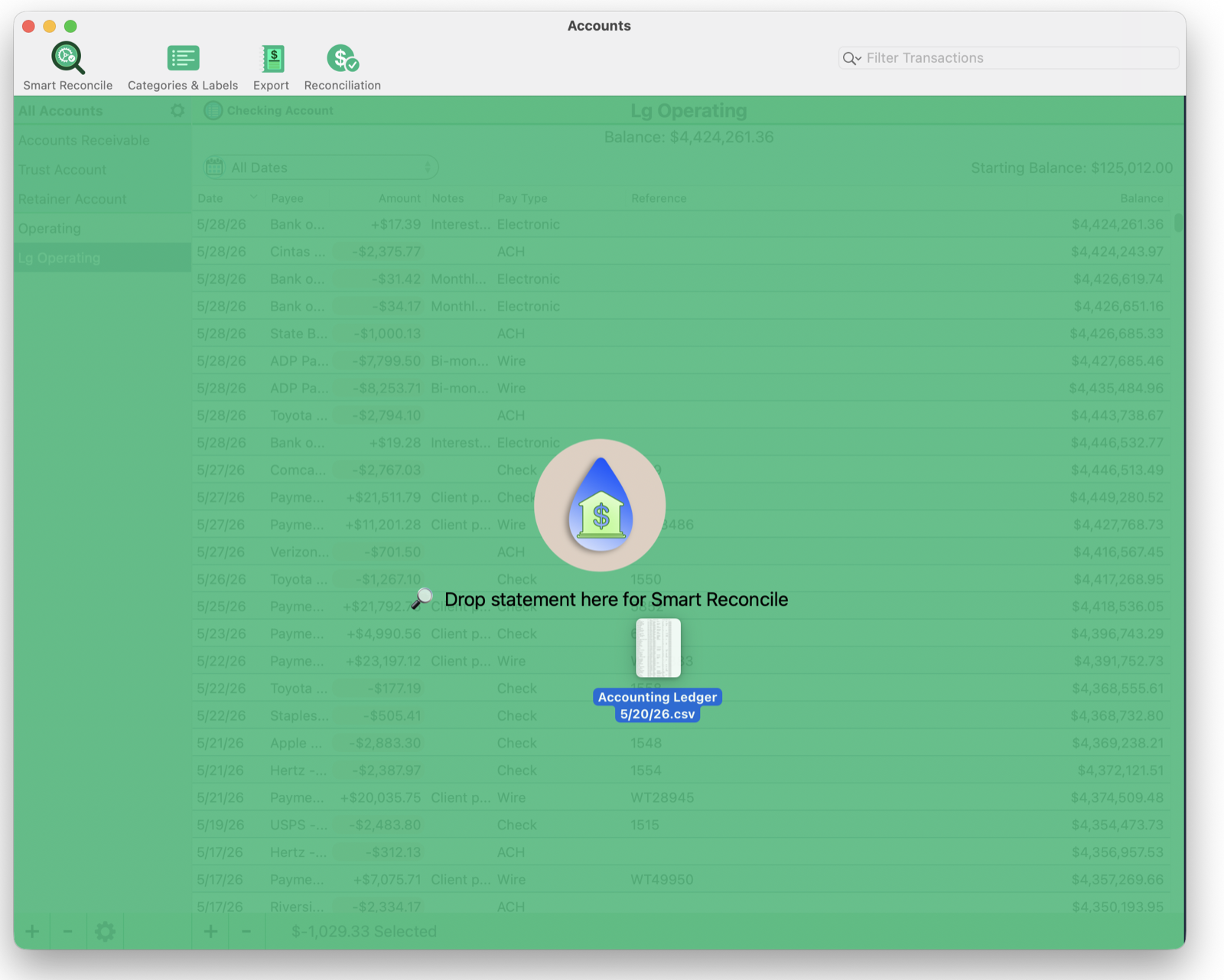
The drop accepts a PDF, CSV, or text file of your bank transactions. Drop it anywhere on the Accounts window and you land in Smart Reconcile with the amounts pre-filled, ready to analyze. No menus, no export dialog, no setup. Just drop and review.
Analyze
Click Analyze. In about the time it takes to read this sentence, Smart Reconcile has compared every line on your statement against every entry in your ledger.
It works in two passes. First, a fast, exact matcher pairs up everything obvious: same amount, same date, the clean matches that make up the bulk of any statement. It also catches the near-misses on purpose, a sign that is flipped or a date that is off by a day or two. Then the local AI takes whatever is left and pairs up the stragglers, always treating the bank as the source of truth. What survives both passes is a genuine discrepancy, and that is the only thing it puts in front of you.
Reviewing Discrepancies
Smart Reconcile presents discrepancies one at a time, as cards. Your bank statement on the left, your ledger on the right, a confidence score, and a sentence telling you exactly what is wrong.
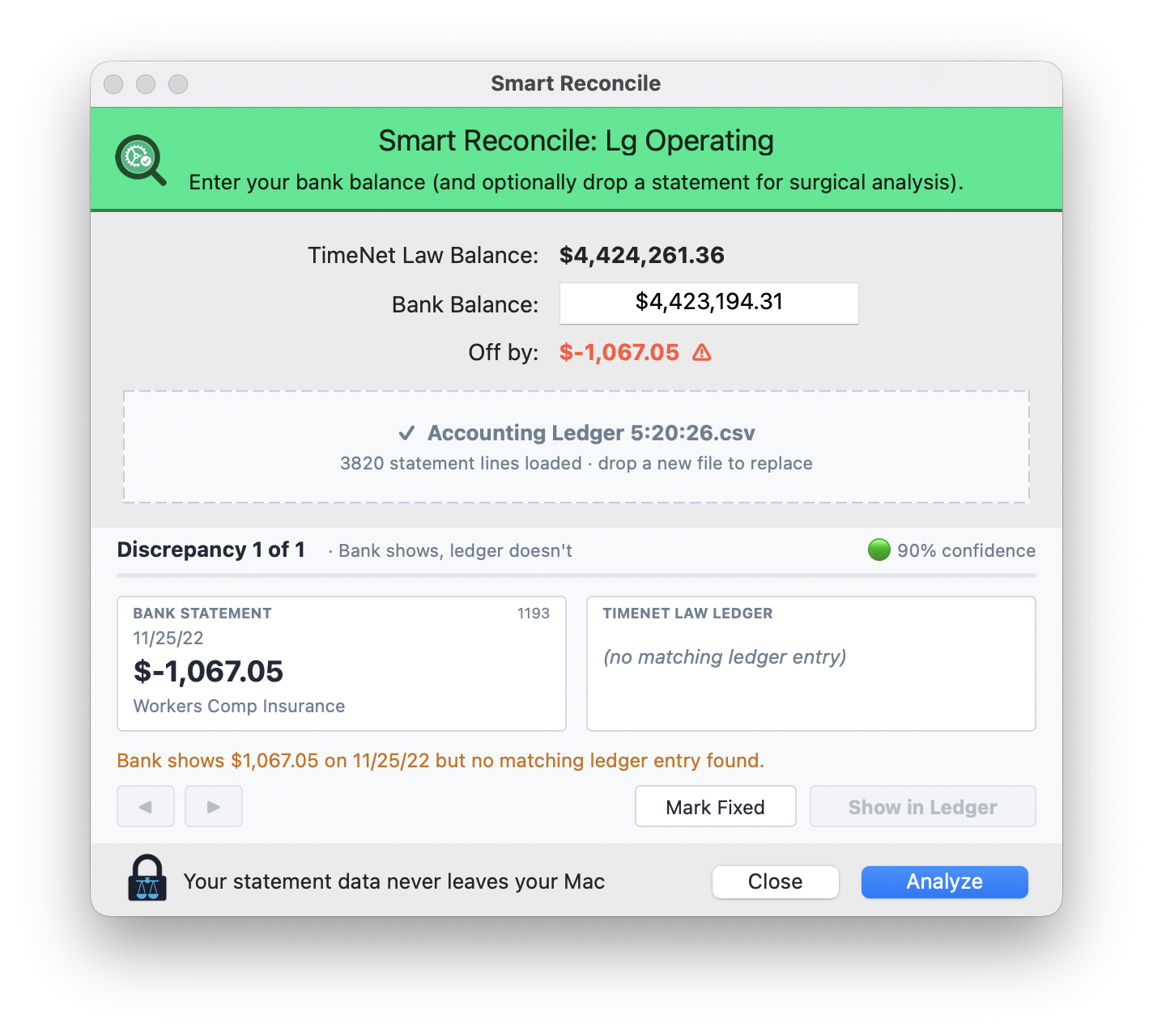
This one is clear: the bank shows a $1,067.05 Workers Comp Insurance payment on 11/25, and there is no matching ledger entry, flagged at 90% confidence. A check cleared and was never recorded. Step through each discrepancy with the arrows. When you have handled one, click Mark Fixed and move on. Show in Ledger jumps you straight to the right spot so you can make the correction.
The confidence score is there so you can trust the easy ones and scrutinize the close calls. A 90% missing-entry flag is almost always exactly what it says. A lower score is the engine telling you to look twice before you reach for the ledger.
What It Catches
Smart Reconcile does not just flag that something is off. It names the kind of error, because knowing the type is half the fix.
| Discrepancy | What It Looks Like | Why It Hides |
|---|---|---|
| Sign Flip | A deposit recorded as a withdrawal | Right digits, wrong direction. The balance is off by exactly twice the amount. |
| Digit Transposition | $1,067 entered as $1,076 | The classic. The error is always a multiple of nine, and your eye reads right past it. |
| Cents Typo | $450.00 entered as $45.00 | A decimal in the wrong place disappears in a long column of numbers. |
| Missing Entry | On the bank, not in the ledger | A check that cleared but was never recorded, or recorded twice. |
| Date Drift | Right amount, wrong day | Matches on money but not timing. Usually a month-end cutoff. |
On a 3,800-line test ledger, Smart Reconcile found all seven planted errors in about ten seconds, including a sub-cent transposition that would take a person an afternoon with a calculator and a prayer.
Fix It Live
Smart Reconcile floats above your ledger instead of locking it. So you can correct a discrepancy in the Accounting window with the reconciliation still open beside it, and watch the Off by indicator tick toward zero as each fix lands. The window even pins itself to the side of the ledger automatically, so you never think about placement.
It is less a report you read and more a partner working next to you. Fix, watch the gap shrink, fix again, until the number hits zero.
Local and Private
Trust account data is the most sensitive information in your firm, and it never leaves your Mac. The entire matching engine, including the local AI that pairs the tricky residual lines, runs on your machine through Oasis. No cloud. No upload. No third party holding your clients' financial records.
The lock at the bottom of the window is not decoration. Your statement data never leaves your Mac. Reconciliation that respects bar discipline, on software that respects client confidentiality.
A Clean Reconciliation
When everything matches, Smart Reconcile tells you so, plainly. A clean statement reconciles in silence and you get the all-clear. When it does not, you get a short, specific list of exactly what to fix, not a wall of numbers to decode.
Either way, the chore that used to eat an afternoon is done before your coffee gets cold. That is reconciliation worth doing every time, which, for a trust account, is the only kind worth doing.
Related Tutorials
Questions About Trust Reconciliation? Just Ask Perry.
Smart Reconcile is built to be obvious, but trust accounting is serious business. If you want a walkthrough on your own books, call, email, or screen share. The person who built this will show you around personally.