When you have a few hundred clients, the flat list stops being useful. The people who owe you money, the matters about to blow their budget, the clients who have gone quiet, they are all in there somewhere, buried among everyone else. The information you actually need is invisible precisely when you need it.
Smart Groups fix that. A Smart Group is a saved set of rules, and TimeNet Law keeps it filled with exactly the clients who match, automatically, in real time. You define "what counts as a problem" once, and the group watches for it forever.
HERO VIDEO COMING SOON
Right-click → New Smart Group → add rules → Save → it fills itself and stays current. A fifteen-second loop.
What Smart Groups Are
There are two ways to organize clients in TimeNet Law. A regular Group is a folder you fill by hand: you make it, name it, and drag clients in. A Smart Group is the opposite. You never add anyone. You write the rules, and TimeNet Law decides who belongs, then keeps the membership correct on its own as your data changes.
That difference is everything. A manual group of "VIP clients" is right until someone's status changes and you forget to move them. A Smart Group of "clients overdue past 90 days" is never wrong, because it rechecks itself every time the data moves.
Where They Live
Your groups sit in the main window sidebar, right under your clients and matters, in their own Smart Groups section. Click one and the client list instantly narrows to just its members.
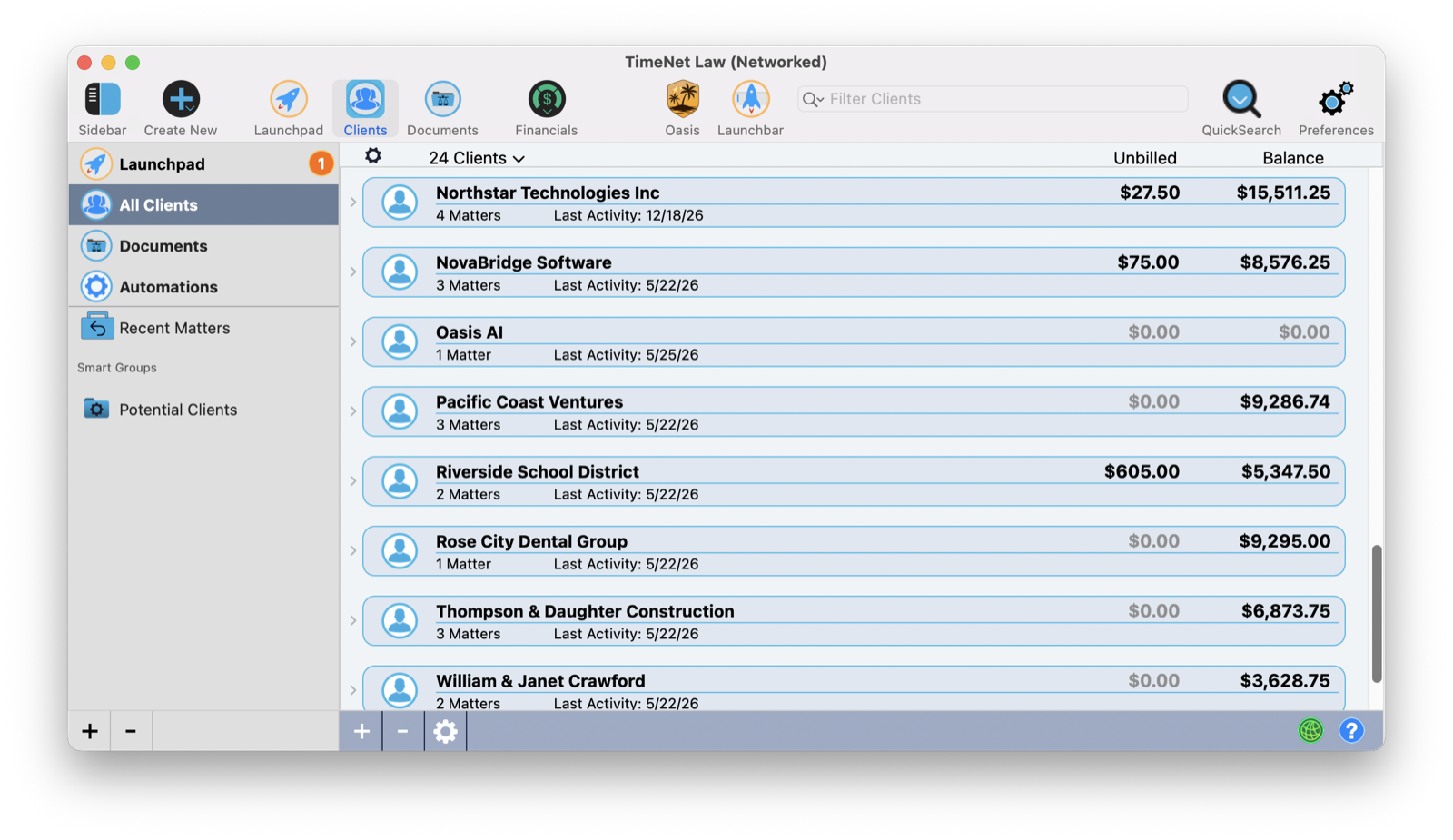
This is the fastest way to focus. Instead of running a report and waiting, you click a Smart Group and the answer is already on screen. Click All Clients at the top to drop the filter and see everyone again.
Building One: The Rule Builder
Right-click in the sidebar's group area and choose New Smart Group. Give it a name that says what it is for, then build the rules. Each rule is a plain row: an attribute, a comparison, and a value.
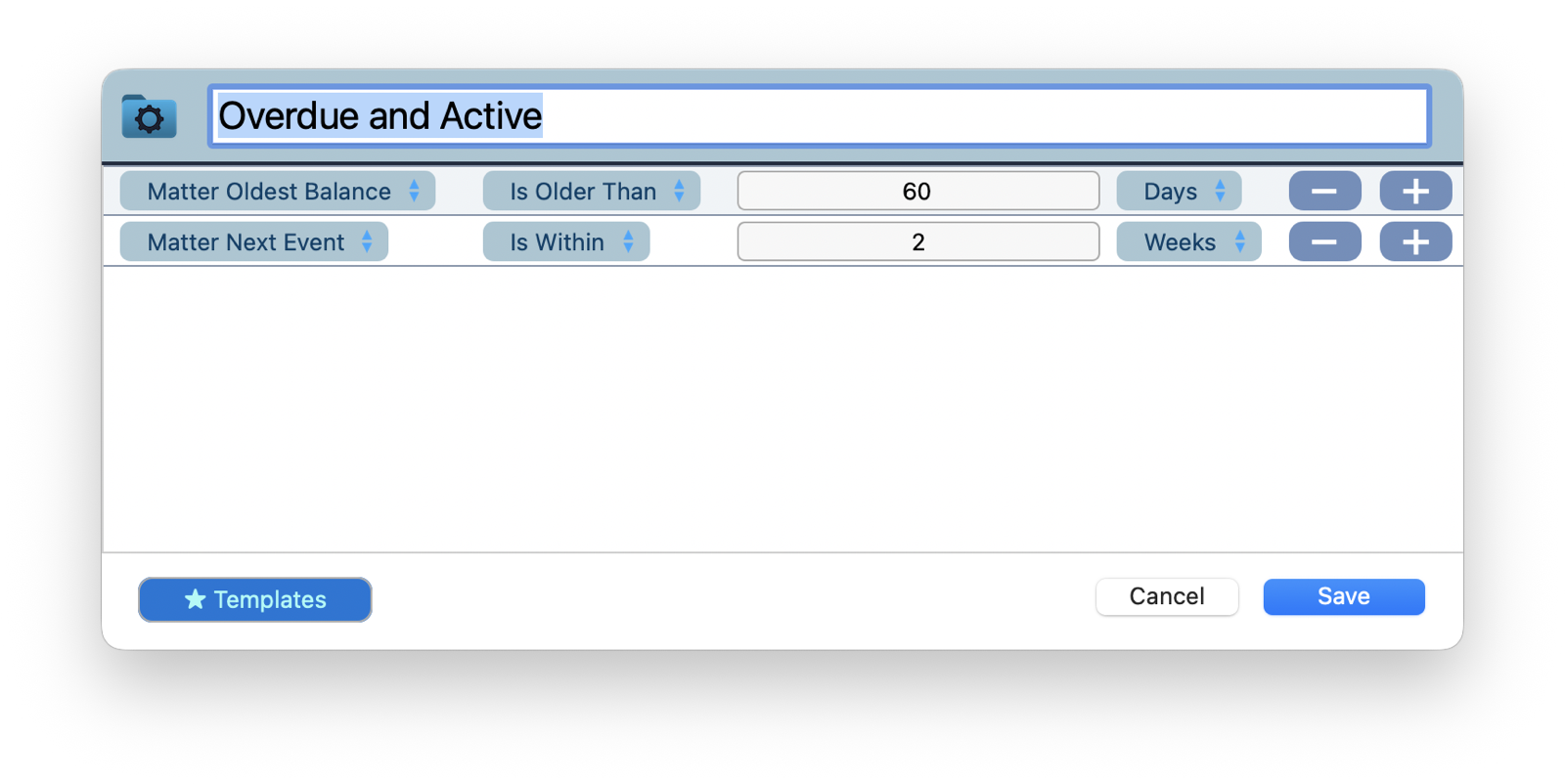
The group above, Overdue and Active, is two rules: Matter Oldest Balance is older than 60 days, and Matter Next Event is within 2 weeks. Together they surface exactly the clients you want to chase: ones who owe you money and have something on the calendar soon, so a quick call can cover both. Use the + button to stack more rules, the − to drop one, and decide whether a client must match all of your rules or any of them. Start from the Templates button if you would rather tweak a working group than build from scratch.
What You Can Filter On
The reason Smart Groups can answer almost any question is the range of attributes a rule can test. You can filter on the client, the matter, or both in the same group.
By the client: name, status, category, parties, notes, last activity, next event, the date you met them, even a birthday, and the full financial picture, unbilled, current balance, trust, escrow, and UAC balances, and last payment.
By the matter: name, practice area, status, stage, group, parties, custom fields, notes, opened and closed dates, last activity, next event, oldest and current balance, unbilled, trust and escrow balances, and last payment, plus the yes-or-no flags that catch so much on their own: on billing hold, contingency matter, master matter.
Combine any of those with comparisons like is, is older than, is within, and greater than, and there is almost no slice of your practice you cannot describe in a rule or two.
Rules Worth Stealing
The power is in the combinations. A few that earn their place in any firm's sidebar:
| Smart Group | The Rule |
|---|---|
| Aging Receivables | Unpaid invoice older than 90 days |
| Slipping Away | No activity in the last 6 months |
| Your Best Clients | Total billed this year over $50,000 |
| Approaching Budget | Matter budget utilization over 80% |
| Overdue and Active | Oldest balance older than 60 days, and next event within 2 weeks |
Each of these is a question you should be asking every week. As a Smart Group, you ask it once and the answer is always waiting in the sidebar.
They Update Themselves
This is the part that makes Smart Groups feel like magic. They are live. The moment a client's invoice ages past 90 days, they appear in your Aging Receivables group. The moment you log work on a quiet matter, that client drops out of Slipping Away. You never refresh, rebuild, or re-run anything.
Treat your Smart Groups like a dashboard. Build three or four that represent the things you never want to miss, money aging out, matters approaching budget, clients going cold, and glance at them at the start of each week. If a group is empty, that part of your firm is healthy. If it is not, you are looking at your to-do list.
Filter and Find
Smart Groups are also just a fast way to navigate. Click any group and the main list filters in an instant, with no loading delay. Need someone specific inside a big group? Type in the search bar while the group is selected and you are searching within that slice, not the whole firm. Click All Clients to clear the filter and you are back to the full list.
Groups, the Manual Sibling
Regular Groups still have their place for the things rules cannot capture, the judgment calls. Right-click the sidebar, choose New Group, and drag clients in, or right-click a client and choose Add to Group. A client can live in several groups at once, so a corporate client who is also a VIP simply belongs to both. Use manual Groups for "clients I personally handle" and Smart Groups for "clients who meet a condition," and between them you can slice your practice any way you think.
Always Current
A report tells you how things looked the moment you ran it. A Smart Group tells you how things are, right now, every time you glance at it. That is the difference between checking on your firm and your firm keeping watch for you.
Build the handful of groups that matter to you this week. From then on, the clients who need your attention will be waiting in the sidebar, sorted, current, and one click away.
Related Tutorials
Want Help Designing Your Smart Groups? Just Ask Perry.
Tell me what you want to keep an eye on and I will help you turn it into the right rules. Call, email, or screen share, and the person who built this will set them up with you.