What You'll Learn
How to create custom fields for invoices, set up entry topics to categorize time entries, and produce invoices that meet specific client billing requirements.
Every matter is different, and your invoices should reflect that. Custom fields add matter-specific details to printed invoices, while entry topics group time entries into logical categories. Both are configured per-matter so you can tailor each one to the client's requirements.
Where to Find It
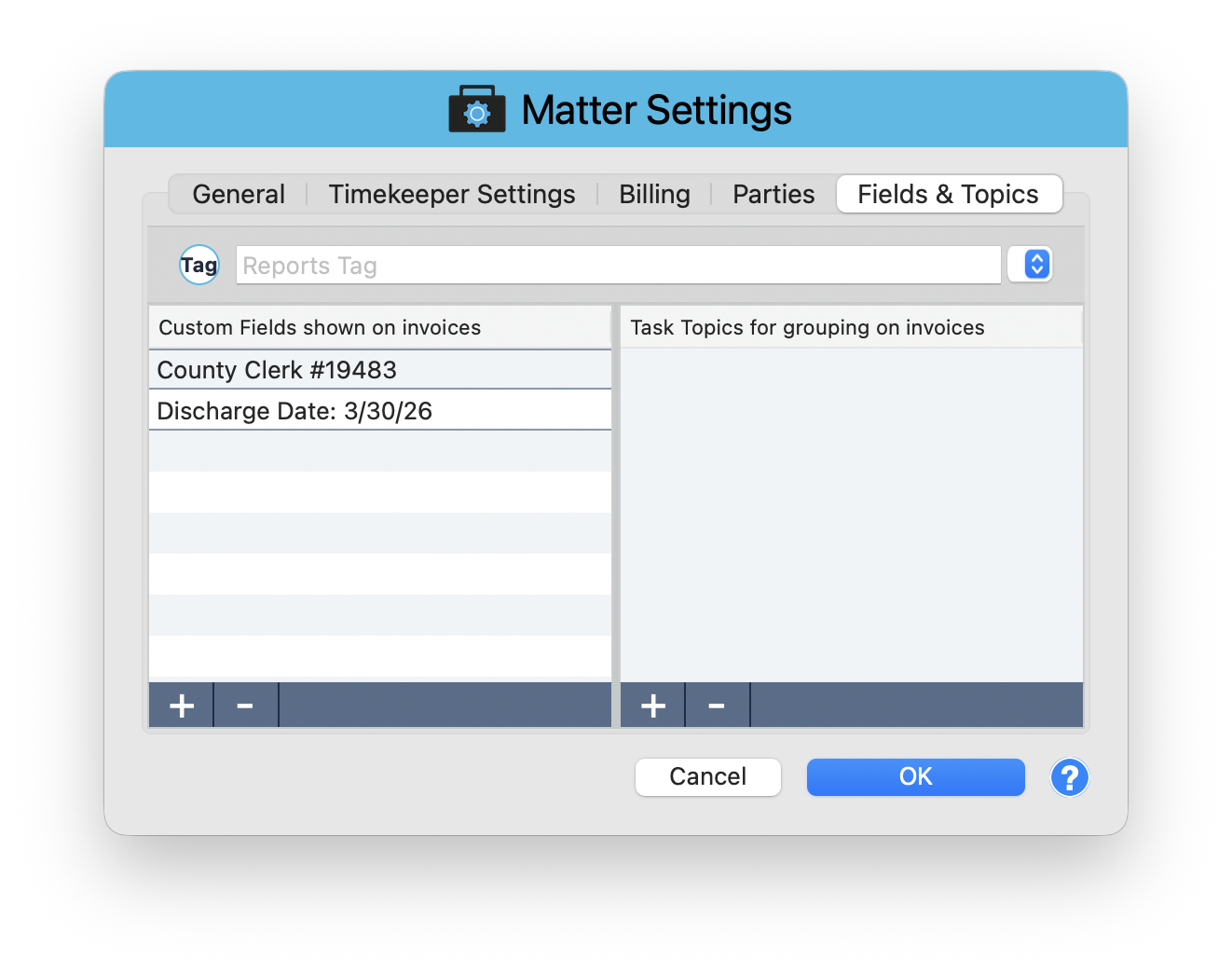
Custom fields and topics are configured in Matter Settings > Fields and Topics tab. Open the Matter window, click Matter Settings in the toolbar, then select the Fields and Topics tab.
Reports Tag
At the top of the tab is a Reports Tag dropdown. This tag lets you filter and group matters in reports. Assign a tag like "Insurance Defense" or "Corporate" to make it easy to pull reports for specific categories of work.
Custom Fields Shown on Invoices
The left column is labeled "Custom Fields shown on invoices." These are free-text fields that appear on printed invoices for this matter. Use them for any matter-specific reference information the client expects to see.
Examples
- County Clerk #19483 - A case reference number the client needs on every invoice
- Discharge Date: 3/30/26 - A key date relevant to billing
- Claim Number - Insurance claim identifiers
- Policy Number - For insurance defense matters
Click the + button to add a new field. Click the - button to remove one. Fields appear on invoices exactly as you enter them.
Task Topics for Grouping on Invoices
The right column is labeled "Task Topics for grouping on invoices." Topics let you organize time entries into logical groups that appear as separate sections on the invoice.
How Topics Work
- Create topics like "Discovery," "Trial Prep," "Depositions," or "Motions"
- When entering time, assign each entry to a topic
- On the invoice, entries are grouped under their topic headings instead of appearing in one flat list
- This makes invoices easier for clients to review and understand
Use the + and - buttons to manage topics for this matter.
Corporate clients with billing guidelines often require specific reference numbers on every invoice. Set these up as custom fields at the start of the engagement so they are included automatically.
Professional Invoices, Every Time
Custom fields and topics transform a generic invoice into a document tailored to the matter. Reference numbers, case identifiers, and organized entry groupings show clients that you take their billing requirements seriously.
Keep exploring:
- Expense Tracking - record and categorize billable expenses
- Discounts, Markdowns, and Write-Offs - billing adjustments for every scenario
- Matter Budgets - set spending caps and track progress
Custom Fields Confusing? Perry Can Help.
Perry will walk you through setting up custom fields and topics so your invoices match exactly what your clients need.