What You'll Learn
The difference between discounts, markdowns, and write-offs. When to use each one, how to apply them in TimeNet Law, and how each affects your realization and collection rates.
Not all billing adjustments are the same. Discounts, markdowns, and write-offs each serve a different purpose and happen at a different stage of the billing process. Using the wrong one (or confusing them) can distort your financial reports and give you an inaccurate picture of firm profitability.
Here is the quick version: markdowns happen before invoicing, discounts happen during invoicing, and write-offs happen after invoicing. Let's dig into each one.
Markdowns - Pre-Invoice Adjustments
A markdown reduces the billable value of a specific entry before the invoice is created. It is entered on the slip itself, in a dedicated Markdown field that takes a dollar amount.
This is the part worth understanding: a markdown does not change the hours or the rate. You do not edit the time, and you do not edit the rate. The entry keeps every original value exactly as it was recorded, and the markdown is subtracted from the computed total as its own separate variable. Your worked value, your hours, and your rate history all stay intact. That is precisely what makes realization measurable later, because the original number survives alongside the reduced one.
When to Use Markdowns
- Efficiency adjustments - A junior associate took 3 hours on a task that should have taken 1.5 hours. The 3 hours stay on the record; you mark down the dollar value of the extra 1.5 hours so the client is not billed for them.
- Courtesy reductions on a single entry - You want to knock a specific amount off one piece of work without touching the rate you bill that client.
- Internal review - During pre-bill review, a partner decides certain entries are excessive and reduces them.
- Client guidelines - Some corporate clients have billing guidelines that cap time for specific activities. Mark down entries to comply.
How to Apply a Markdown
Open the Entry
Before generating an invoice, review the entries for the billing period and open the one that needs adjusting. Markdowns are applied per entry, on the slip itself.
Enter a Dollar Amount in the Markdown Field
The entry window has a Markdown field alongside the rate controls. Enter the dollar amount you want to come off this entry. Leave the hours and the rate exactly as they are. The entry's total drops by the markdown amount as soon as you enter it.
Generate the Invoice
When you create the invoice, it bills the reduced total. The client sees only the adjusted amount, while your records keep the original hours and rate.
The Markdown field appears only on billable entries. If the entry's status is "For My Eyes Only" or "No Charge" the field is hidden, along with the rate controls, because there is no billable value to reduce. The field also becomes read-only once the entry has been billed onto an invoice.
Markdowns affect your realization rate (the percentage of worked value that actually gets billed). If your realization rate is low, it might mean your team is consistently spending more time than clients will pay for. That is a staffing or training issue, not a billing issue.
Discounts - Invoice-Level Adjustments
A discount reduces the invoice total before you send it to the client. The client sees the full charges and the discount as a separate line item. It is a courtesy or negotiated reduction.
When to Use Discounts
- Negotiated fee reductions - You agreed to a 10% discount for a long-term client
- Volume discounts - Reduced rates for clients who send a high volume of work
- Goodwill gestures - A courtesy discount to maintain a relationship after a difficult matter
- Prompt payment incentives - A discount for paying within a certain number of days
How to Create a Discount
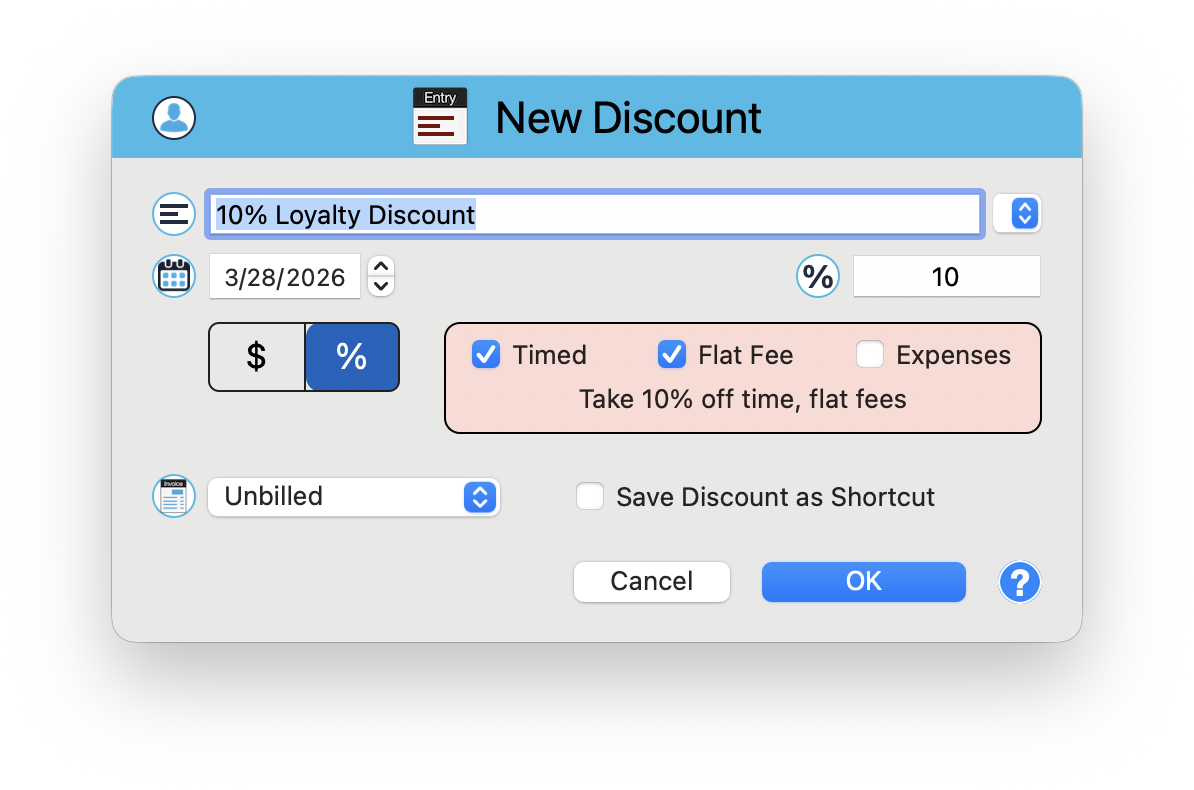
In the Matter window, create a New Discount entry. The discount window gives you precise control over what gets discounted and by how much.
Set the Description
Enter a description like "10% Loyalty Discount." The description field includes a dropdown for saved shortcuts, so frequently used discounts are one click away.
Choose Dollar or Percentage
Use the $ / % toggle to switch between a flat dollar discount and a percentage discount. When percentage is selected (highlighted blue), enter the percentage value.
Select What It Applies To
Checkboxes let you choose any combination of entry types: Timed entries, Flat Fee entries, and Expenses. A live summary updates as you make selections, for example: "Take 10% off time, flat fees."
Save the Discount
Click OK to apply. Check "Save Discount as Shortcut" to save this configuration for quick reuse on future discounts.
Write-Offs - Post-Invoice Adjustments
A write-off removes charges that will not be collected after the invoice has been sent. The client was billed, but payment is not coming. This is bad debt or uncollectible amounts.
When to Use Write-Offs
- Uncollectible invoices - A client cannot or will not pay, and you have exhausted collection efforts
- Partial payments - A client pays part of the invoice and you agree to write off the remainder
- Disputed charges - After a billing dispute, you agree to remove certain charges
- Statute of limitations - Invoices that are so old they are no longer worth pursuing
How to Record a Write-Off
A write-off is recorded in the Payment Center, as a payment type. There is no separate "write-off" command on a right-click or cog menu. You are telling TimeNet Law that the balance is being cleared without money arriving, so it runs through the same path as a payment.
Open the Payment Center
Choose Window → Payment Center, or press Cmd+3. Select the client in the client list, then select the matter if the write-off applies to a single matter.
Click New Payment
Switch from Payment History to the New Payment panel.
Set the Type to Write Off
In the Type popup menu, choose Write Off. It sits just below Direct Deposit, in its own group. The reference field beside it changes its prompt from "Check Number" to Reason.
Enter the Amount and the Reason
Type the amount being written off and the reason in the Reason field. Then check the invoice or invoices it applies to in the invoice list. You can write off a full invoice or part of one by editing the amount in the invoice row.
Click Apply Payment
The outstanding balance on the invoice decreases by the write-off amount, and your aging reports reflect the updated balance. The write-off appears in Payment History with the type Write Off, and the Writeoff filter checkbox below the payment list shows or hides these entries.
Write-offs affect your collection rate (the percentage of billed amounts that you actually collect). A high write-off rate is a red flag. It might mean you are taking on clients who cannot pay, or that your invoices are not being sent promptly enough.
Side-by-Side Comparison
Here is how the three adjustments compare:
- Markdown - Happens before invoicing. A dollar amount entered on the entry, in its own field. Hours and rate stay as recorded. Affects realization rate. Client never sees the original amount.
- Discount - Happens during invoicing. Reduces the invoice total. Affects realization rate. Client sees both the full amount and the discount.
- Write-Off - Happens after invoicing. Removes uncollectible charges from the outstanding balance. Affects collection rate. Client was already billed.
Example Scenario
An attorney bills 10 hours at $400/hour on a matter. Here is what each adjustment looks like:
- Original value: $4,000
- After an $800 markdown: The entry still reads 10 hours at $400. The Markdown field holds $800, so the invoice shows $3,200. Realization rate: 80%.
- After discount (10% off $3,200): Invoice total: $2,880. Client sees $3,200 minus $320 discount.
- After write-off ($500 uncollectible): You collected $2,380 of the $2,880 billed. Collection rate: 82.6%.
The overall effective collection on the original $4,000 of work: 59.5%. Understanding where the money goes at each stage is the key to improving firm profitability.
Impact on Firm Profitability Reports
Each adjustment type flows into different metrics in your financial reports:
- Realization rate = Billed / Worked. Affected by markdowns and discounts.
- Collection rate = Collected / Billed. Affected by write-offs.
- Overall effective rate = Collected / Worked. Affected by all three.
TimeNet Law tracks all three adjustment types separately, so you can pinpoint exactly where value is being lost. Is the problem that your team is over-working matters (markdowns)? That you are giving away too much (discounts)? Or that clients are not paying (write-offs)? The data tells the story.
Review your markdowns, discounts, and write-offs quarterly. Look for patterns. If one client consistently requires large markdowns, it might be time to renegotiate the engagement terms or adjust staffing. Data-driven billing decisions beat gut feelings every time.
Use the Right Tool for the Job
Markdowns, discounts, and write-offs are three different tools for three different situations. Use each one correctly, and your financial reports will give you an accurate, actionable picture of firm performance. Mix them up, and you are making decisions based on bad data.
Keep exploring:
- Contingency Billing - track matters where you are not billing hourly at all
- Tax Rules and Late Fees - billing compliance and overdue invoice management
- Custom Billing - advanced billing workflows
Not Sure Which Adjustment to Use? Perry Can Help.
Perry can explain the difference and show you how to apply each one correctly in your specific situation.