Clients do not dispute the work. They dispute the description of the work. A line that reads "Research, 1.0" invites a phone call. A typo on a $400 entry makes the whole invoice look careless. "Misc. tasks" gets written down by a billing committee that never sees what you actually did. The work was real, but the entry undersold it, and the money walked out the door.
Anomaly Detection catches those problems while they are still fixable, before the invoice goes out. One scan reads every entry on the matter and flags the ones that will cause trouble, with a severity and a specific fix for each.
HERO VIDEO COMING SOON
Click Anomalies → every weak entry flagged by severity → fix each → a clean, bill-ready matter. A fifteen-second loop.
Why Sloppy Entries Cost You
Every weak time entry is a small tax on your collections. Vague descriptions get questioned or trimmed. Typos erode the trust that makes a client pay without a fight. Duplicate lines look like double-billing even when they are not. And a fat-fingered duration, 89 hours where you meant 8.9, is either an awkward correction later or a credibility problem now. None of it is fraud. All of it costs money.
The fix is a final read of your entries with fresh, critical eyes, the read you never quite have time for. That is the job Anomaly Detection does in a couple of seconds.
Running the Scan
Open the matter and click Anomalies in the toolbar. Oasis reads every entry on the matter and opens a panel listing what it found, each issue tied to the exact entry it came from.
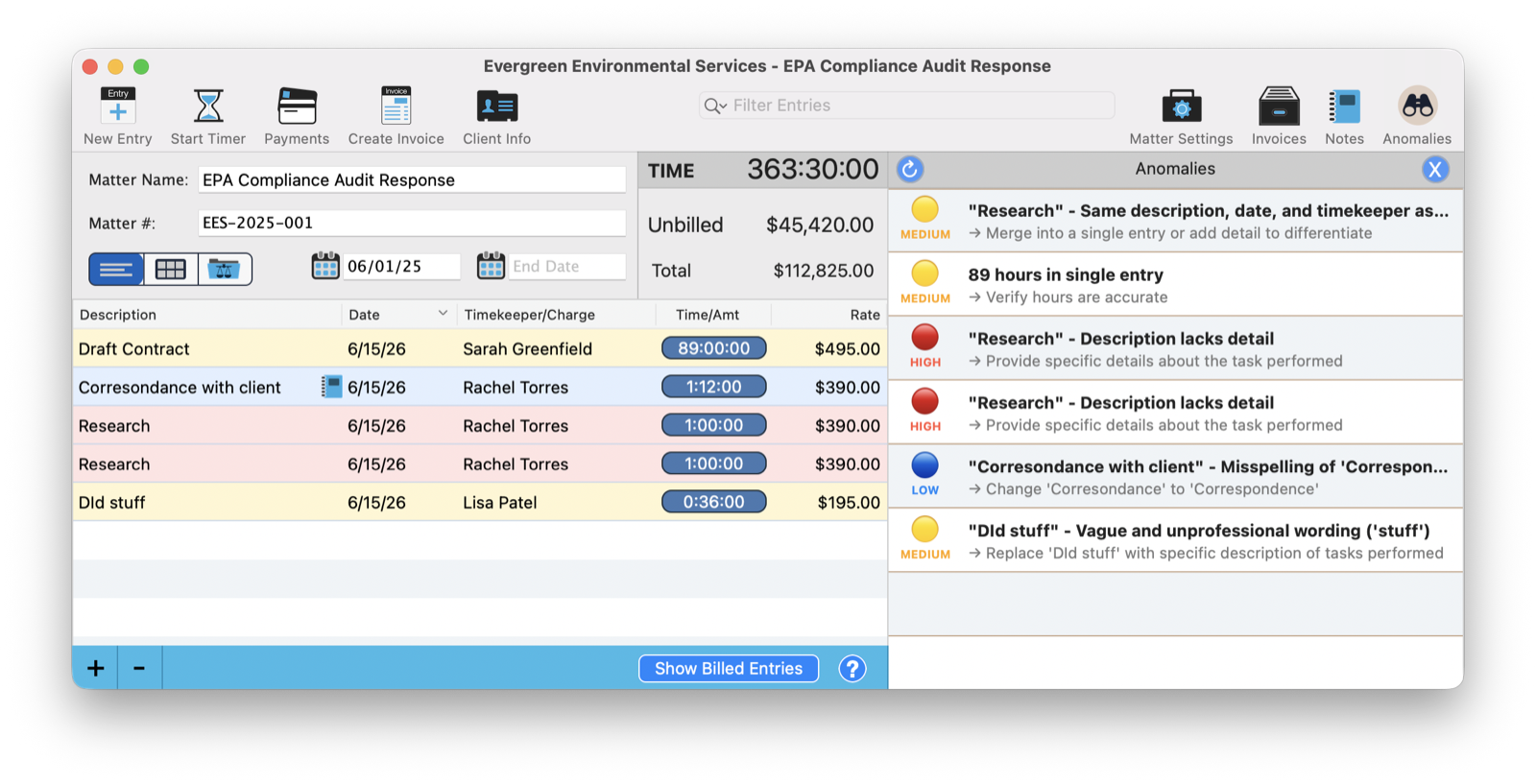
That is the whole interaction. No setup, no rules to configure. Click the button, and a moment later you are looking at a prioritized list of everything on this matter that a careful billing partner would want changed before the invoice goes out.
What It Flags
The scan looks for the specific problems that cause invoices to be questioned, not stylistic nitpicks. The usual suspects:
| Anomaly | Example From a Real Scan |
|---|---|
| Description Lacks Detail | "Research" with nothing about what was researched |
| Unprofessional Wording | "Dld stuff" — vague and not client-ready |
| Spelling Error | "Corresondance with client" |
| Duplicate Entries | Two identical "Research" lines, same day, same timekeeper |
| Outlier Duration | 89 hours on a single entry, which may not be accurate |
Severity at a Glance
Not every flag deserves the same attention, so each one is ranked High, Medium, or Low. A description with no detail on a big-ticket entry is High, the kind of thing that gets a bill bounced. A single misspelling is Low, worth fixing but not urgent. The ranking lets you triage: clear the High flags before you bill, tidy the rest when you have a minute.
Every Flag Comes With a Fix
This is what separates Anomaly Detection from a spellchecker. It does not just tell you something is wrong, it tells you what to do about it. "Corresondance" comes with "change to Correspondence." A bare "Research" comes with "provide specific details about the task performed." "Dld stuff" comes with "replace with a specific description of tasks performed." Two identical lines come with "merge into a single entry or add detail to differentiate." You are never left guessing what good looks like.
The outlier-duration check is quietly one of the most valuable. An 89-hour entry that should have been 8.9 is the kind of mistake that is mortifying on a client's desk and easy to miss in your own list. Catching it in the scan turns a credibility problem into a two-second correction nobody ever sees.
A Pre-Billing Habit
The best time to run the scan is the moment before you generate an invoice. Open the matter, click Anomalies, clear what it finds, then bill. It becomes a thirty-second ritual that turns out clean, defensible invoices every time, the kind that get paid on the first pass instead of landing in a client's billing review.
Local and Private
The review runs on your Mac through Oasis. Your time entries, with their client names and case detail, are never sent to a cloud service to be analyzed. The most candid read of your own billing happens entirely in-house, which is exactly where it should.
Bills Worth Paying
A clean invoice is not just about getting paid faster, though it does that. It is about how your firm looks every time it asks to be paid. Tight, specific, error-free entries say you are careful with the client's matter and the client's money both.
Run the scan before you bill. Clear the flags. Send invoices you would be glad to defend, because you already have.
Related Tutorials
Want Anomaly Detection Tuned to Your Billing Guidelines? Just Ask Perry.
If your clients enforce specific billing rules, tell me and I will walk through how the scan helps you meet them. Call, email, or screen share, and the person who built this will go through it with you.