Time rounding is one of those things that sounds simple but gets tricky fast. Round up and you risk overbilling. Round down and you leave money on the table. And if you pause and resume a timer, most systems compound the rounding error each time. TimeNet Law's Smart Rounding handles all of this correctly, so you can bill fairly and accurately without thinking about it.
What Smart Rounding Does
Smart Rounding automatically rounds your timer to your firm's billing increment when the timer stops. But here is the key difference: when you pause and resume, the timer picks back up from your actual elapsed time, not the rounded time.
Why does this matter? Without Smart Rounding, here is what happens with a 6-minute (0.1 hour) increment:
- You work for 4 minutes, pause. System rounds up to 6 minutes (0.1 hr).
- You resume and work 3 more minutes. System sees 6 + 3 = 9 minutes, rounds to 12 (0.2 hr).
- Your actual time was 7 minutes (which should round to 0.1 hr), but the system says 0.2 hr.
That is rounding creep. It inflates your totals over time. Smart Rounding prevents this by tracking your actual elapsed time separately from the displayed rounded time.
Billing Increments
Your billing increment is the smallest unit of time you bill. The most common options:
- 6-minute increments (1/10th hour): The industry standard. Most firms use this. 6 minutes = 0.1 hours.
- 15-minute increments (1/4th hour): Some firms prefer larger increments. 15 minutes = 0.25 hours.
- 1-minute increments: No rounding at all. Exact time to the minute.
Configure your increment in Preferences → App Settings → Timer Behavior.
The Pause and Resume Behavior
This is where Smart Rounding really shines. Here is the correct behavior, step by step:
Start the timer
You begin working. The timer starts counting from 0:00.
Pause at 4 minutes
You take a break. The display shows 0:04 actual, 0.1 hr rounded.
Resume
When you un-pause, the timer resumes from 0:04 actual, not from the rounded 0:06.
Stop at 7 minutes total
You finish the task. Actual elapsed: 7 minutes. Smart Rounding rounds to 0.1 hr (6 minutes), which is correct for 7 minutes of actual work.
Without Smart Rounding, step 3 would have resumed from 0:06, and you would end up at 0:09 (rounded to 0.2 hr). Smart Rounding saved you from billing 0.1 hr more than you actually worked.
Smart Rounding tracks two numbers internally: the actual elapsed seconds (for accuracy) and the displayed rounded time (for billing). You always see the rounded time, but the system never loses track of the real number.
Preventing Rounding Creep
Rounding creep is a real problem in legal billing. Every pause-and-resume cycle can add a few extra minutes if the system rounds at each stop. Over a day of billing, this can add up to significant overbilling.
Smart Rounding eliminates this completely:
- Rounding only happens when you finalize the entry, not at each pause
- Actual elapsed time is preserved through every pause/resume cycle
- The final rounded time accurately reflects your total actual work
- Your clients get billed fairly, and your time records are defensible
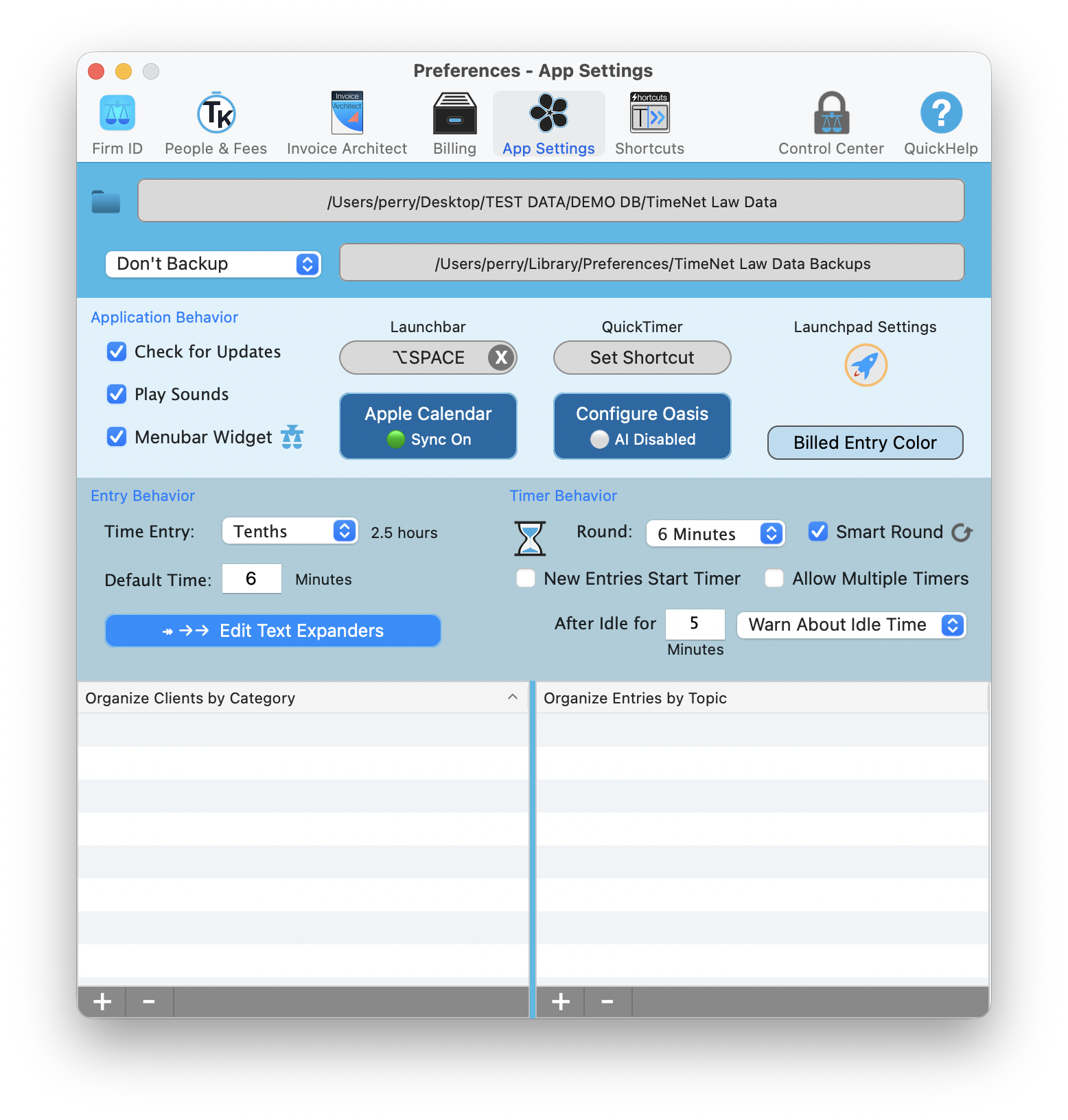
Smart Rounding is configured in Preferences, App Settings, under Timer Behavior. The gear icon opens advanced settings.
Configuring Your Rounding Preferences
Open App Settings
Go to Preferences → App Settings and find the Timer Behavior section.
Set your billing increment
Use the Round dropdown to choose your increment (for example, 6 Minutes).
Enable Smart Round
Check the Smart Round checkbox. Click the gear icon next to it to open advanced rounding settings.
Most firms use 6-minute increments with Smart Round enabled. The gear icon next to the checkbox opens advanced settings for fine-tuning rounding behavior.
Manual vs. Automatic Rounding
Smart Rounding applies automatically when you use timers. But what about manual time entries?
- Timer entries: Smart Rounding applies automatically. The system handles everything.
- Manual entries: You enter the duration directly. TimeNet Law will flag if your entry does not match your billing increment and offer to round it for you. You can accept or keep the exact time.
This gives you the best of both worlds. Automatic accuracy for timers, and gentle guidance for manual entries.
If you manually enter 0.15 hours (9 minutes) with 6-minute increments, TimeNet Law will suggest rounding to either 0.1 or 0.2 hours. Your choice. No silent changes.
Keep exploring:
- Timer Techniques for getting the most out of timers
- Quick Time Entry for fast manual entries
- Billing 101 for billing fundamentals
Questions About Rounding? Perry Can Help.
Screen share with the guy who built it. He'll get you sorted in minutes.